01
Select an outcome before sizing
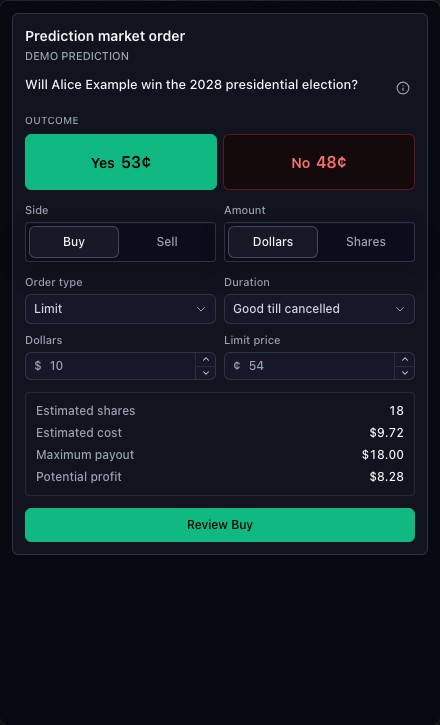
The outcome is the primary selection, with Yes and No labels supplied by the market integration. The draft carries the actual outcome identity; the ticket does not reconstruct it from the label.
02
Inspect price and quantity together
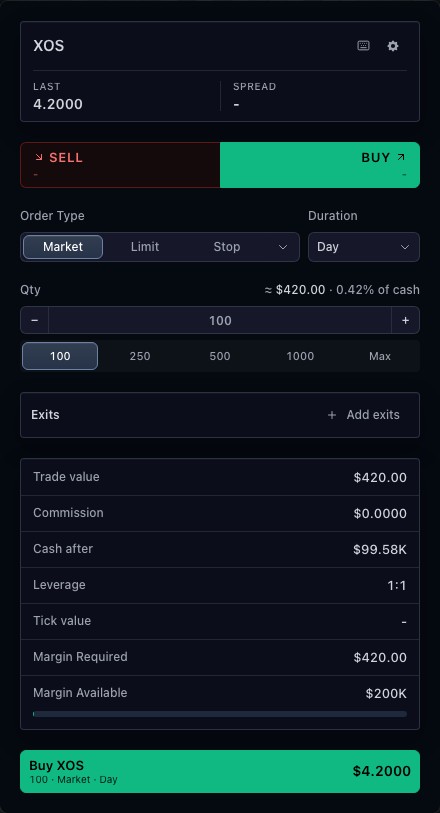
Review the selected side and order fields before submission. Prices and available actions depend on the connected market and broker. The displayed event is an example used to demonstrate the product controls.
03
Connect a provider explicitly
The host integrates event contracts and broker execution. A displayed outcome is distinct from a settled result, and submitted orders still require authoritative broker updates. The public walkthrough uses a simulation.
How to use prediction market order ticket
- Open the prediction-market ticket.
- Switch between the available outcomes.
- Compare Buy and Sell, then inspect quantity and price.
- Review the selected outcome in the draft before any simulated submission.
Data behind this view
Requires outcome identities and a broker adapter supporting prediction-market orders.
Common questions
Does the demo trade a real event?
No. The public ticket uses an example event and simulated trading controller.
Who supplies the outcomes?
Your market integration supplies the event contracts and outcome identities.