Prediction-market order ticket
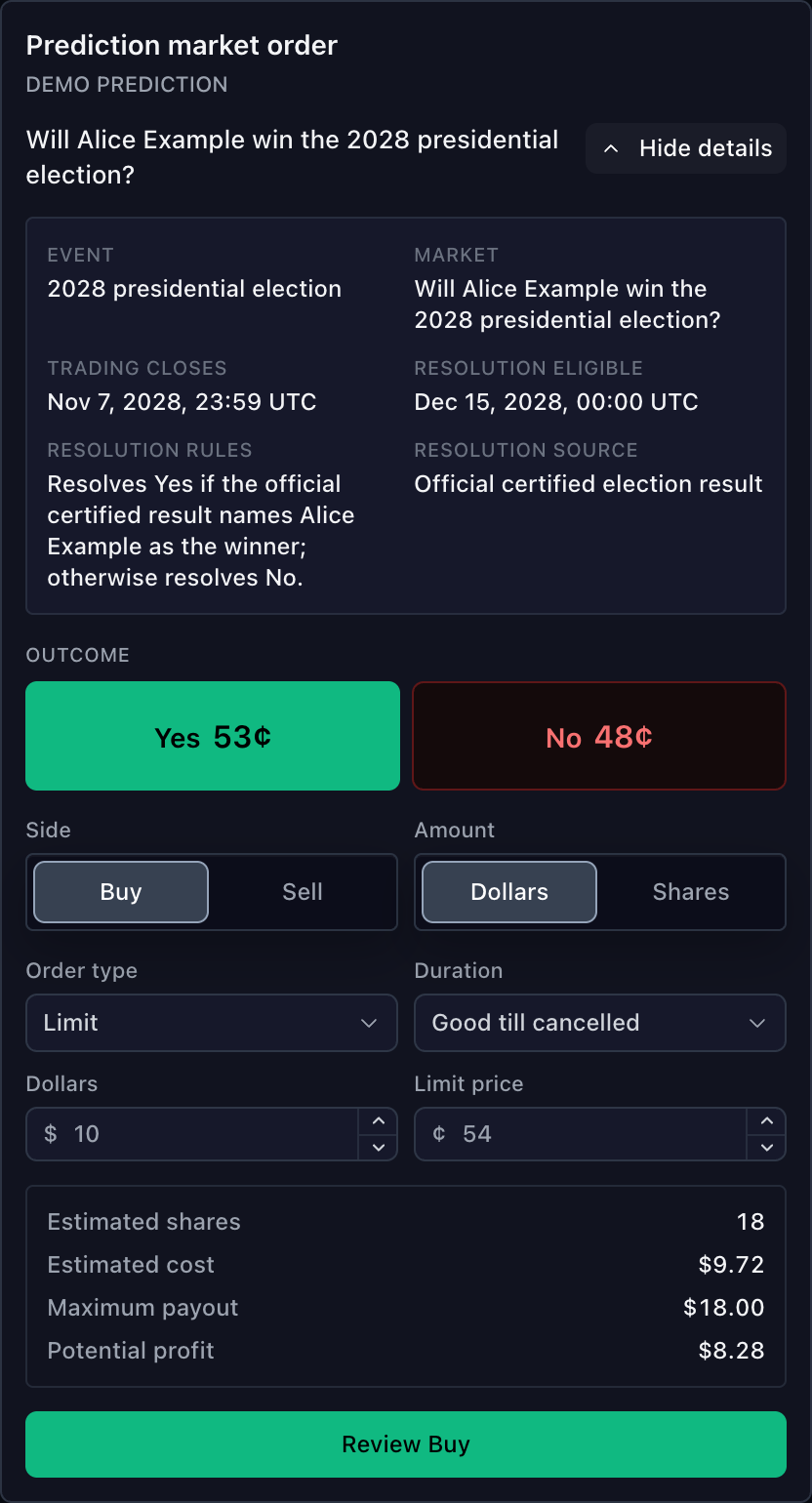
PredictionMarketOrderTicket trades one exact outcome token within a prediction
market. It uses the shared TradingControllerApi and requires broker preview
before placement. Use the standard Order ticket for ordinary
instruments.
The React component comes from
@tradescript/pro/react/widgets/prediction-market-order-ticket. Use
sdk.predictionMarketOrderTicket.mount(...) for the framework-neutral surface.
Keep outcome and side separate
Market data owns exact outcome identity and quotes. The broker owns tradability, inventory, preview, placement, and authoritative order state.
Outcome and side are independent:
- Buy Yes acquires the Yes token.
- Buy No acquires the No token.
- Sell Yes disposes of or shorts the Yes token.
- Selling Yes is not the same order as buying No.
Supply one resolved symbol and one independently bound quote per outcome. Never
derive No from payout - Yes; the two order books can have different spreads,
fees, liquidity, and executable prices.
Prepare exact outcomes
Every symbol must carry PredictionContractInstrumentDetails with one exact
eventId, marketId, and outcomeId. Preserve provider, catalog selection,
market-data series, and broker execution identities instead of rebuilding them
from ticker text.
import type {
  PredictionContractInstrumentDetails,
  PredictionMarketOrderTicketOutcome,
  PredictionMarketOrderTicketSymbol,
} from '@tradescript/pro/sdk';

const marketTerms = {
  kind: 'prediction-contract',
  eventId: 'event-election-2028',
  marketId: 'market-alice-wins',
  eventTitle: '2028 presidential election',
  marketTitle: 'Will Alice Example win the 2028 election?',
  priceConvention: 'cents',
  payout: { amount: 1, currency: 'USD', settlementAsset: 'venue-usd' },
  resolutionRules: { criteria: 'Resolves Yes if the certified result names Alice Example.' },
  resolutionSource: 'Official certified result',
} satisfies Omit<PredictionContractInstrumentDetails, 'outcomeId' | 'outcomeLabel'>;

const yes: PredictionMarketOrderTicketSymbol = {
  ticker: 'ALICE-2028:YES',
  canonicalSymbol: 'feed:venue:alice-2028:yes',
  selectionId: 'catalog:alice-wins:yes-token',
  marketDataSeriesId: 'series:alice-wins:yes-token',
  brokerSymbol: 'venue-token-alice-yes',
  provider: 'customer-prediction-feed',
  exchange: 'CUSTOMER-VENUE',
  name: 'Yes',
  type: 'prediction-contract',
  currency: 'USD',
  tickSize: 1,
  pricePrecision: 0,
  instrument: { ...marketTerms, outcomeId: 'yes-token', outcomeLabel: 'Yes' },
};

const no: PredictionMarketOrderTicketSymbol = {
  ...yes,
  ticker: 'ALICE-2028:NO',
  canonicalSymbol: 'feed:venue:alice-2028:no',
  selectionId: 'catalog:alice-wins:no-token',
  marketDataSeriesId: 'series:alice-wins:no-token',
  brokerSymbol: 'venue-token-alice-no',
  name: 'No',
  instrument: { ...marketTerms, outcomeId: 'no-token', outcomeLabel: 'No' },
};

export const outcomes = [
  { symbol: yes, tone: 'positive', quote: { symbol: yes, last: 53, bid: 52, ask: 54 } },
  { symbol: no, tone: 'negative', quote: { symbol: no, last: 48, bid: 47, ask: 49 } },
] satisfies readonly PredictionMarketOrderTicketOutcome[];
All outcomes in one ticket must share the same provider, event, market, terms,
price convention, and payout. Outcome ids and symbol/series identities must be
unique. tone is explicit presentation authority; use neutral when an outcome
is neither semantically positive nor negative.
See Mixed-asset catalogs for catalog grouping and Symbol search for resolving each tradable outcome.
Mount the React ticket
Pass the licensed SDK products, shared trading controller, and complete outcome
set. TradeScriptProvider from @tradescript/pro/react/provider can supply
sdk, but trading remains an explicit session authority.
import type {
  PredictionMarketOrderTicketOutcome,
  TradeScriptSdkProducts,
  TradingControllerApi,
} from '@tradescript/pro/sdk';
import {
  PredictionMarketOrderTicket,
} from '@tradescript/pro/react/widgets/prediction-market-order-ticket';

declare const sdk: TradeScriptSdkProducts;
declare const trading: TradingControllerApi;
declare const outcomes: readonly PredictionMarketOrderTicketOutcome[];

export function PredictionOrder() {
  return (
    <PredictionMarketOrderTicket
      sdk={sdk}
      trading={trading}
      outcomes={outcomes}
      defaultOutcomeId="yes-token"
      defaultAmountMode="cash"
      defaultCashAmount={25}
      defaultOrderType="limit"
      contractDetails={{ presentation: 'collapsible', defaultOpen: true }}
      onPreview={(preview) => console.info('Preview accepted:', preview.accepted)}
      onOrderRejected={(message) => console.warn('Placement rejected:', message)}
    />
  );
}
For controlled outcome selection, provide both selectedOutcomeId and
onOutcomeChange. Otherwise use defaultOutcomeId; the first source-ordered
outcome is the fallback.
Size and price the order
Shares mode submits the entered quantity. Cash mode treats the amount as a
budget, converts it with the limit price or executable-side quote, and rounds
down to the broker's quantityStep. The resulting draft still carries a share
quantity; cash mode is not a broker-native notional order.
Keep one price convention through quotes, limit input, draft, preview, and placement:
| Convention | A displayed 53% price | Typical step |
|---|---|---|
probability | 0.53 | 0.01 |
cents | 53 | 1 |
The ticket seeds Buy limits from the selected outcome's ask and Sell limits
from its bid, with last trade as a fallback. It never uses another outcome's
quote. Return quantity and price steps, limits, supported market/limit rules,
and durations from getTradingSymbolInfo().
Review, then place
Review sends the current draft and quote context to previewOrder. An
accepted result enables Place for that reviewed snapshot; changing outcome,
side, sizing, price, duration, or account invalidates it. Placement includes the
preview confirmId when present.
Callback boundaries are deliberate:
onPreviewreceives every broker preview result, accepted or rejected.onOrderAcceptedruns only when placement returnsaccepted: true.onOrderRejectedruns only when placement returnsaccepted: false; a rejected preview is reported throughonPreview, notonOrderRejected.
A placement transport failure has an unknown outcome. The ticket requires reconciliation with canonical broker orders before another attempt. The backend must still repeat account, inventory, price, liquidity, and risk checks for both preview and placement.
Make Sell inventory-aware
Sell targets the selected outcome symbol. The ticket subtracts active sell
reservations from the selected account's long position. Shorting is available
only when both the account and the exact symbol route declare
supportsShortSelling: true; missing authority at either level means
inventory-only selling.
Browser state is useful validation, not authorization. Recheck inventory and short-sale permission atomically in the broker backend.
Trading close and settlement
Set instrument.tradingCloseTime only from a provider-owned trading cutoff.
The ticket blocks local submission after that time, while the backend enforces
current market status during preview and placement.
Resolution rules and eligibility dates are display facts. The backend decides the winning outcome, settlement, and payouts, then publishes resulting orders, positions, executions, and balances. The ticket never derives settlement from market text.
Customize and verify
Use theme, labels, slotClassNames, and slotStyles for presentation. Use
sections or renderRegion only for host-owned React content at typed semantic
boundaries. contractDetails supports collapsible, popover, and inline
presentation.
Verify these boundaries before release:
- Selecting No carries the No symbol and No quote through preview and placement.
- Cash sizing rounds down to the exact symbol's
quantityStep. - Selling without inventory stays disabled unless both shorting authorities are true.
- Editing a reviewed draft removes Place until another preview succeeds.
- A rejected preview calls
onPreviewonly; a rejected placement callsonOrderRejected. - Broker state publishes the exact outcome identities after placement and settlement.
Next steps
- Order entry — compare prediction markets with the standard and option ticket flows.
- Broker integration — implement symbol rules, preview, placement, and authoritative state.
- Orders — publish the broker lifecycle after placement.
- Executions — publish fills with the exact prediction-contract symbol.