Watchlist Widget
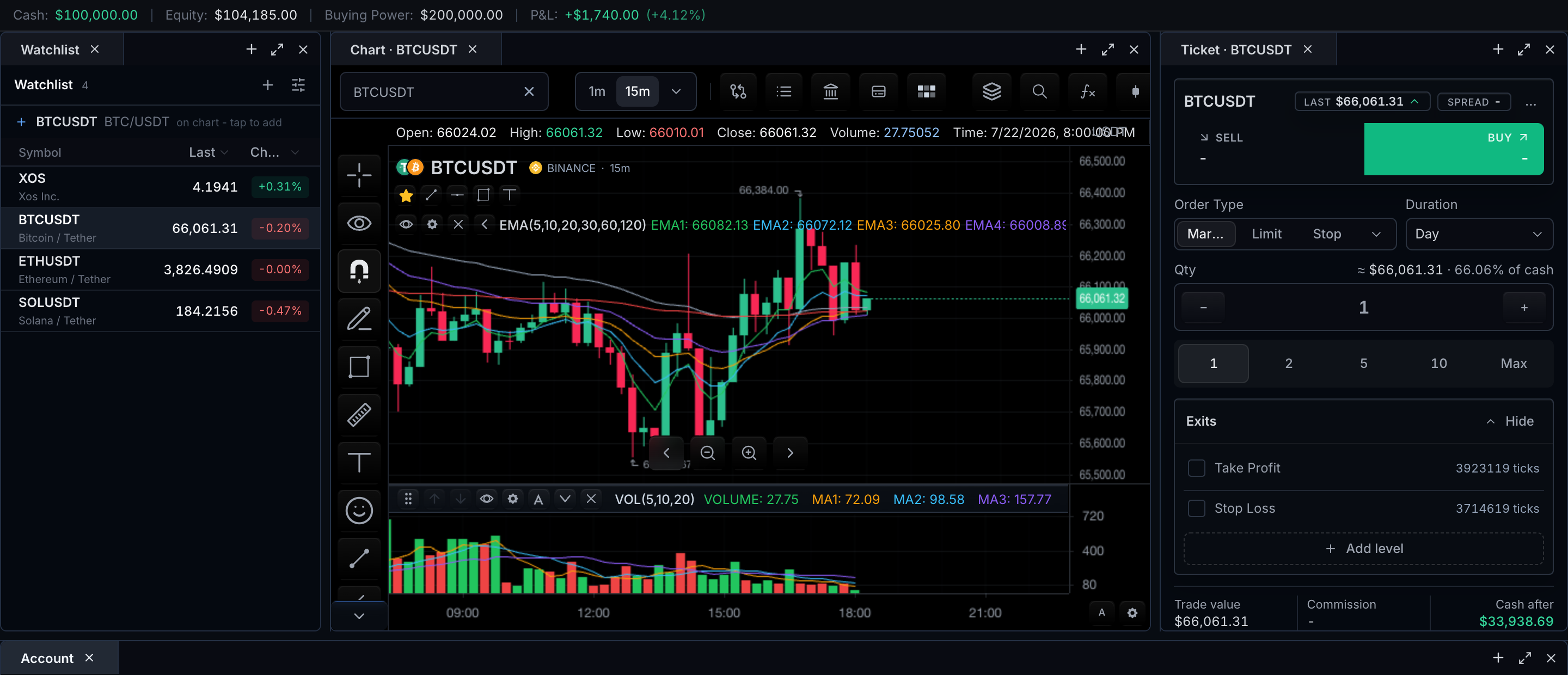
Two watchlist surfaces exist, and every section below says which one it belongs to:
- Built-in chart rail — the native chart toolbar renders the active watchlist
when
features.watchlistis enabled and the feed reportssupportsWatchlist. Data comes from the datafeed's watchlist methods; the chart owns the UI. - Host-composed panel — the exported
BrokerWatchlistReact component. The host supplies an adapter and owns list storage, sharing, permissions, and cross-tab synchronization; the widget owns quote streaming, symbol search, table UX, sections, logos, context menu, and drag-reorder chrome.
Both read the same kind of data, so a product can start with the native rail and move to a host panel without changing the feed.
Minimal watchlist
The smallest host-composed watchlist is a single-list adapter with one method:
import { BrokerWatchlist } from '@tradescript/pro/react'
import type { WatchlistAdapter } from '@tradescript/pro/sdk/trading'

const adapter: WatchlistAdapter = {
  getSymbols: () => [
    { ticker: 'AAPL', exchange: 'NASDAQ' },
    { ticker: 'MSFT', exchange: 'NASDAQ' },
  ],
}

<BrokerWatchlist
  adapter={adapter}
  datafeed={datafeed}
  onSymbolSelect={(ticker) => setTicker(ticker)}
  quoteColumns={['last', 'change', 'changePercent']}
/>
Verification steps for this minimal path:
- Render: both rows appear with ticker and exchange; no mutation controls are shown because the adapter implements none.
- Quote update: when the feed pushes a new quote for
AAPL, the row's last price and change columns update without rebuilding the list structure. - Symbol change: clicking the
MSFTrow firesonSymbolSelect('MSFT'); wire it to your chart's symbol setter and confirm the chart loads MSFT. - Persistence: reload the page. The rows come back because
getSymbols()re-reads host state — the widget itself persists nothing. Whatever store backs your adapter is the persistence path to test.
Built-in chart rail
Enable with features.watchlist (object form supports enabled,
multipleLists, and crossTabSync). Data flows through the datafeed
watchlist contract, which the market-data controller exposes:
const controller = widget.data();

const lists = await controller.listWatchlists();
const active = await controller.getWatchlist();

await controller.createWatchlist({
  id: 'momentum',
  name: 'Momentum',
  symbols: [{ symbol: { ticker: 'AAPL', exchange: 'NASDAQ' } }],
});

await controller.renameWatchlist({ id: 'momentum', name: 'Opening Drive' });
await controller.updateWatchlist({ id: 'momentum', symbols: active.symbols });
await controller.setActiveWatchlist({ id: 'momentum' });
await controller.deleteWatchlist({ id: 'momentum' });
For chart-owned add behavior, call chart.addSymbolToWatchlist(...). The
method defaults to the current chart symbol and active/default list, writes
through the datafeed watchlist contract, emits watchlist-change, and can
open the native watchlist rail. The default add-symbol-to-watchlist
shortcut action binds Alt+W and uses that same method with
openPanel: true.
Host-composed panel: BrokerWatchlist
BrokerWatchlist is adapter-driven. A single-list WatchlistAdapter needs
only getSymbols; every optional method or field unlocks UI (see
feature gating). A MultiWatchlistAdapter
adds list management:
import {
  type BrokerWatchlistHandle,
  type MultiWatchlistAdapter,
  type WatchlistSparklineAdapter,
} from '@tradescript/pro/sdk/trading'
import { BrokerWatchlist } from '@tradescript/pro/react'
import { useRef } from 'react'

const multiListAdapter: MultiWatchlistAdapter = {
  getLists: () => [{ id: 'default', name: 'Default', isDefault: true }],
  getSelectedListId: () => 'default',
  selectList: async (id) => { /* switch active list */ },
  createList: async (name) => ({ id: crypto.randomUUID(), name }),
  renameList: async (id, name) => { /* rename */ },
  deleteList: async (id) => { /* delete non-default */ },
  createShareLink: async (listId, options) => ({
    shareToken: '…',
    shareUrl: `https://app.example/shared/watchlists/…`,
  }),
  moveSymbolToList: async (ticker, targetListId) => { /* move */ },
  getSymbols: () => [{
    ticker: 'AAPL',
    colorTag: 'green',
    notes: 'breakout',
    group: 'Mega Cap',
    logoUrl: 'https://…/aapl.png',
  }],
  addSymbol: async (ticker) => { /* add to active list */ },
  removeSymbol: async (ticker) => { /* remove from active list */ },
  updateSymbol: async (ticker, patch) => { /* update metadata */ },
  reorderSymbols: async (orderedTickers) => { /* persist order */ },
}

const sparkline: WatchlistSparklineAdapter = {
  getPoints: async (ticker) => [1, 2, 1.5, 2.2, 2.1],
}

function Example() {
  const ref = useRef<BrokerWatchlistHandle>(null)

  return (
    <BrokerWatchlist
      ref={ref}
      adapter={multiListAdapter}
      datafeed={datafeed}
      symbol={activeSymbol}
      onSymbolSelect={(ticker) => setTicker(ticker)}
      sort={sortPreference}
      onSortChange={setSortPreference}
      sparkline={sparkline}
      quoteColumns={['last', 'change', 'changePercent', 'volume', 'sparkline']}
      showLogos
      // readOnly
    />
  )
}
Props
| Prop | Description |
|---|---|
adapter | WatchlistAdapter or MultiWatchlistAdapter |
datafeed | Optional. Uses TradeScriptProvider datafeed when omitted |
quotes | Optional host-owned quote map (skips datafeed quote subscriptions) |
symbol | Current chart symbol (add-current-symbol CTA) |
onSymbolSelect / onSymbolChange | Selection callbacks |
quoteColumns | last, bid, ask, change, changePercent, volume, sparkline |
sort / onSortChange | Controlled sort preference |
selectedTickers / onSelectedTickersChange | Controlled row-selection state for keyboard and batch workflows |
prewarm | Optional host prewarm adapter |
sparkline | Optional mini-series provider for sparkline column |
readOnly | Force-hide all mutation controls |
showLogos | Render logoUrl when present (default true) |
labels | Partial i18n overrides |
Row schema
Each row is a WatchlistSymbol. The identity field is ticker
(canonicalSymbol wins for quote-map keys when present); everything else is
optional display or routing metadata:
- Identity and routing:
ticker,canonicalSymbol,provider,exchange,listedExchange,marketType,type,currency. - Display:
name,logoUrl,colorTag,notes,group(section headers),sortOrder. - Session and data quality:
session,timezone,dataStatus(streaming,delayed,end-of-day,offline).
Quotes and session badges
Quote streaming is widget-owned: rows subscribe through the datafeed prop
(or the TradeScriptProvider datafeed), unless the host supplies a quotes
map, in which case no datafeed quote subscriptions are made and search still
uses the datafeed.
- Connectivity:
quote.status - Session badge:
quote.metadata.sessionStatus/session→PRE/OPEN/POST/CLOSED→ Pre / AH / Cl
Actions and feature gating
UI appears only when the adapter (or props) can back it:
| Capability | UI enabled |
|---|---|
addSymbol | Add current symbol |
removeSymbol | Remove control + context menu remove |
updateSymbol | Color tags + notes |
reorderSymbols | Drag handle reorder (when sort is cleared) |
getLists | Multi-list tabs |
createShareLink | Share panel |
moveSymbolToList | Context menu "Move to …" |
symbol.group | Section headers |
symbol.logoUrl + showLogos | Logos |
sparkline prop + sparkline column | Mini trend column |
readOnly | Disables mutations regardless of methods |
ref | Programmatic API (BrokerWatchlistHandle) |
Rows use roving keyboard focus. ArrowDown/ArrowUp move to the next or
previous symbol and call onSymbolSelect; Space advances to the next row,
Shift+Space moves to the previous row, Enter activates the focused row,
Shift+Arrow extends row selection, and Ctrl/Cmd+A selects all visible rows
through onSelectedTickersChange.
Programmatic API
The ref handle is the widget's WatchlistController:
const handle = watchlistRef.current
await handle?.addSymbol('MSFT')
await handle?.reorderSymbols(['MSFT', 'AAPL'])
handle?.getSymbols()
The same controller arrives through the onReady(controller) prop once the
mounted table binds it.
Persistence
Persistence ownership differs by surface:
- Built-in rail: the datafeed watchlist methods are the store. Whatever your feed persists (server, local storage) is what survives reload.
BrokerWatchlist: the host adapter is the store. The widget never writes anywhere except through adapter methods;getSymbols()after reload is the restore path. Selection, sort, and column props are host-controlled state.
Synchronization
- Built-in rail:
features.watchlist.crossTabSynckeeps open native watchlist panels fresh when another same-origin tab mutates watchlist state (BroadcastChannel with a localStorage storage-event fallback). BrokerWatchlist: implementsubscribe(andsubscribeLists) on the adapter to push external changes into the widget; cross-tab and cross-device sync are host concerns behind those callbacks.- Chart-to-watchlist:
chart.addSymbolToWatchlist(...)and thewatchlist-changechart event keep chart-owned adds observable by both surfaces.
Design notes
- Persistence stays in the host.
- Single-list adapters remain fully supported.
- Drag reorder is disabled while a quote sort is active (cleared sort restores manual order UX).
Next steps
- Watchlist — the built-in chart rail, its row states, and its datafeed ownership.
- Symbol Search — the resolution path behind every row selection.
- Trading — pairing the watchlist with order and position surfaces in a broker terminal.