Symbol Search Widget
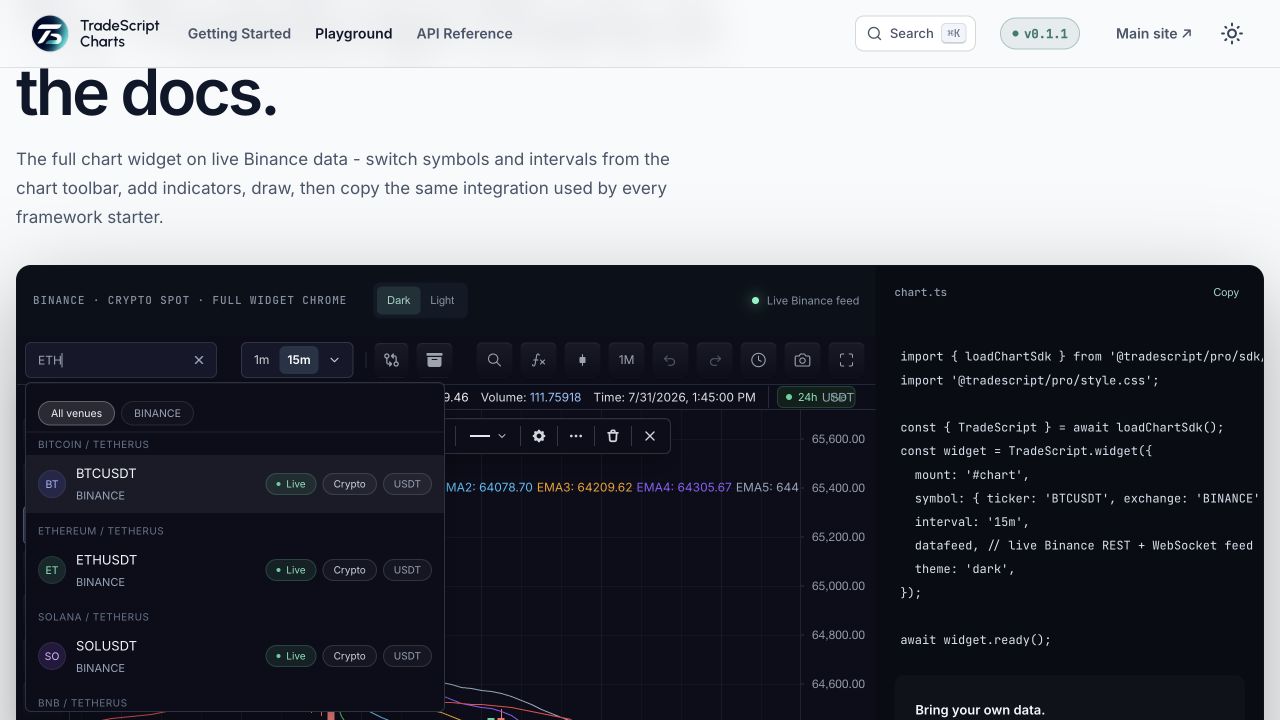
The built-in symbol search lives in the chart toolbar. It queries
datafeed.searchSymbols, displays result metadata, and loads the selected
symbol through the normal datafeed path. The UI flow and its states come first
below, then the configuration and the datafeed contract. The two are
independently testable: the flow against any conforming feed, the feed against
the request and result shapes.
The query → results → select flow
- Open. The user clicks the toolbar search control (or the host calls
chart.openSymbolSearch(), optionally with an initial query). Typed input is uppercased by default (uppercase: true). - Query. After the debounce delay (
requestDelayMs, default 200 ms), the widget callsdatafeed.searchSymbols(request)with the typed text plus any selected exchange filter, asset-type filter, spread-operator flag, and the initiating surface insearchSource. - Results. Each returned row renders its ticker, short display symbol, name
or description, exchange/type/currency/status/provider badges, and logos
when enabled. If the last row carries
nextCursor, scrolling near the end or pressing load-more requests the next page. - Select. The chosen symbol passes through the optional
completeSymbolrewrite, then the chart loads it through the normal symbol-resolution path (resolveSymboland bar loading). The dialog closes.
States
The result list has five observable states:
| State | When | What the user sees |
|---|---|---|
| Default (idle) | Dialog open, no query issued yet | Input focused, filter controls, no result rows |
| Loading | Debounce elapsed, searchSymbols pending | Previous rows remain until the response lands |
| Ready | Response with one or more rows | Result rows; load-more affordance when a nextCursor is present |
| Empty | Response with zero rows and no cursor | "No matches found." |
| Error | searchSymbols rejected | "Unable to reach symbol search." |
Both terminal strings are localizable through the standard resolver surface.
A new keystroke returns the flow to the loading state; closing the dialog
(Escape, selection, or chart.closePopups()) resets it.
Feature gates and toolbar relationships
The search surface appears only when both sides allow it:
- Datafeed capability: the feed declares
supportsSearchin itsMarketDataFeedConfigand implementssearchSymbols. - Widget policy:
features.symbolSearchis enabled (default). Set it tofalseor{ enabled: false }to hide the toolbar search entirely — for example when the host owns symbol navigation.
The same search widget is reused by other surfaces, which identify themselves
through searchSource: 'symbolSearch' (toolbar), 'watchlist' (add
symbol), 'compare' (comparisons dialog), and 'indicatorInputs'
(symbol-valued indicator inputs). Symbol-valued indicator inputs configure
their spread-operator policy separately with
features.indicatorInputs.symbolSearch.
Enable or disable
import { createTradeScriptSdk } from '@tradescript/pro/sdk/core';

const sdk = await createTradeScriptSdk({ lease: deploymentLease });
sdk.chart.mount({
  mount: container,
  symbol: 'NASDAQ:AAPL',
  datafeed,
  features: {
    symbolSearch: true,
  },
})
Hide the toolbar search:
features: {
  symbolSearch: false,
}
or:
features: {
  symbolSearch: { enabled: false },
}
Configure behavior
sdk.chart.mount({
  mount: container,
  symbol: 'NASDAQ:AAPL',
  datafeed,
  features: {
    symbolSearch: {
      enabled: true,
      requestDelayMs: 150,
      uppercase: true,
      showLogos: true,
      showExchangeLogos: true,
      showSpreadOperators: true,
      spreadOperators: {
        exponentiation: true,
        reciprocal: true,
      },
      exchanges: [
        { value: 'NASDAQ', label: 'Nasdaq' },
        { value: 'NYSE', label: 'NYSE' },
      ],
      assetTypes: [
        { value: 'stock', label: 'Stocks' },
        { value: 'crypto', label: 'Crypto' },
      ],
      completeSymbol({ symbol }) {
        return symbol?.canonicalSymbol
          ? { ...symbol, ticker: symbol.canonicalSymbol }
          : symbol ?? ''
      },
    },
  },
})
Options:
| Option | Behavior |
|---|---|
requestDelayMs | Debounce delay before calling searchSymbols. Defaults to 200 ms. |
uppercase | Uppercase typed input before display/search. Defaults to true. |
showLogos | Render logoUrls[0], logoUrl, or logo on results. |
showExchangeLogos | Render exchangeLogoUrl on results. |
showSpreadOperators | Renders spread-operator controls and sends includeSpreadOperators: true to the datafeed. |
searchSource | Sends the initiating surface to the datafeed (symbolSearch, watchlist, compare, or indicatorInputs). |
spreadOperators | Controls individual operator buttons. plus, minus, multiply, and divide default to showSpreadOperators; exponentiation (^) and reciprocal (1/x) default off. |
exchanges | Renders exchange filter controls and forwards selected exchange. |
assetTypes | Controls visible type categories and forwards selected assetType. |
completeSymbol | Rewrites the selected symbol before chart navigation. |
Programmatic control
const mounted = sdk.chart.mount({ mount: container, symbol: 'NASDAQ:AAPL', datafeed })
const chart = (await mounted.ready()).chart()

chart.openSymbolSearch()
chart.closePopups()
openSymbolSearch() focuses and opens the toolbar search. closePopups()
closes symbol search and other chart popovers managed by the chart surface.
Pagination
If your datafeed returns nextCursor on a search result, the widget requests
the next page when the user scrolls near the end of the result list or
presses the load-more button.
async searchSymbols(request) {
  const page = await fetchSymbols(request)
  return page.results.map((symbol, index) => ({
    symbol,
    nextCursor: index === page.results.length - 1 ? page.nextCursor : undefined,
  }))
}
Result metadata
The widget renders:
- ticker
- short display symbol from
SymbolInfo.shortNamewhen provided - name or description
- exchange/type/currency/status/provider badges
- symbol logo
- exchange logo
- structured group label or root
Provide those fields through SymbolInfo from your datafeed.
Next steps
- Symbol Search — the request and response shapes and the server side of this flow.
- Symbol Search Surface — every UI state mapped to its datafeed callback.
- Feature Gates — the
symbolSearchgate and its interaction with toolbar policy.