Agent chat
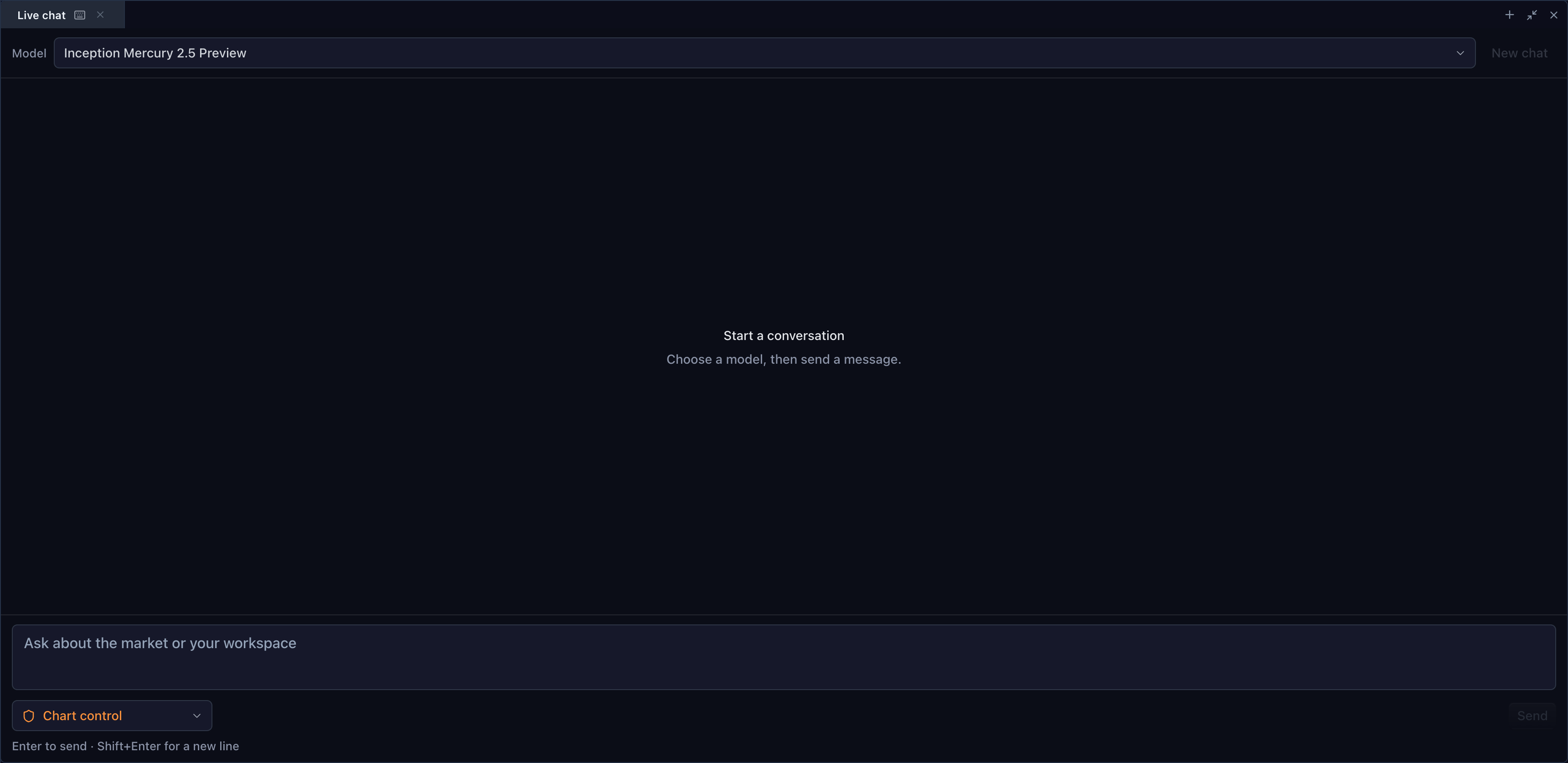
BrokerTradingTerminal can mount a customer-backed chat panel in its workspace.
The SDK owns the accessible chat UI and agent loop. The customer-owned backend
handles model traffic, while your application owns the access choices offered
to its users.
Set panels.agentChat to true to mount the panel explicitly. Supplying a
provider is optional only so the panel can render a safe setup state: without a
customer AgentChatProviderApi, the model selector, composer, and send action
are disabled. The widget does not discover models, issue a network request, or
fall back to a TradeScript or third-party endpoint in that state.
The fresh complete Agent Workspace uses two aligned rows:
- top: Watchlist | Chart | Order ticket | Agent Console;
- bottom: Account | Agent Chat | Market depth | Time & Sales.
Chat and Account are distinct groups. Agent Console occupies the top-right cell
with Time & Sales directly below it. Partial configurations keep Chat as a
normal independent panel; if Account is absent, Chat falls back to its own
260px bottom split. Customers can enable Chat, Console, both, or neither. A
supplied or restored WidgetLayoutState takes precedence over this fresh
topology.
The access picker is not an authorization shortcut. Each selected value must
correspond to a newly attached TradeScript session whose AgenticSessionAccess
contains the real read, write, and trading policy. The chat accepts tools only
when their accessId matches the controlled picker value, so a policy rotation
cannot temporarily execute with stale authority.
Configure access in React
This example offers read-only chart inspection, non-trading chart control, and guarded paper trading. It intentionally does not offer live trading.
import { useEffect, useMemo, useState } from 'react';
import {
  attachTradeScriptSession,
  createTradeScriptAgentChatTools,
} from '@tradescript/chart-mcp/browser';
import {
  AgentChatWidget,
  createHttpAgentChatProvider,
} from '@tradescript/react-widgets/widgets/agent-chat';
import type {
  AgentChatAccessOption,
  AgenticSessionAccess,
  TradeScriptAdapterApi,
  TradeScriptSdkProducts,
} from '@tradescript/pro/sdk';
import { BrokerTradingTerminal } from '@tradescript/react-widgets/widgets/trading-terminal';

declare const sdk: TradeScriptSdkProducts;
declare const adapter: TradeScriptAdapterApi;
const provider = createHttpAgentChatProvider({
  baseUrl: '/api/agent',
  fetch: customerAuthenticatedFetch,
});

type AccessId = 'read-only' | 'chart-control' | 'paper-trading';

const accessOptions: readonly AgentChatAccessOption[] = [
  {
    id: 'read-only',
    label: 'Read only',
    description: 'Can inspect the terminal but cannot change it.',
  },
  {
    id: 'chart-control',
    label: 'Chart control',
    description: 'Can operate chart controls. Trading remains unavailable.',
  },
  {
    id: 'paper-trading',
    label: 'Paper trading',
    description: 'Can submit guarded simulated orders.',
  },
];

function accessPolicy(id: AccessId): AgenticSessionAccess {
  if (id === 'read-only') return { read: true, write: false, trade: false };
  if (id === 'paper-trading') return { read: true, write: true, trade: { mode: 'paper' } };
  return { read: true, write: true, trade: false };
}

export function AgentTerminal() {
  const [accessId, setAccessId] = useState<AccessId>('read-only');
  const session = useMemo(() => attachTradeScriptSession(adapter.agentic, {
    sessionId: crypto.randomUUID(),
    title: 'Customer terminal',
    access: accessPolicy(accessId),
  }), [accessId]);

  useEffect(() => () => session.detach(), [session]);

  const tools = useMemo(() => createTradeScriptAgentChatTools(session, {
    accessId,
  }), [accessId, session]);

  return (
    <BrokerTradingTerminal
      sdk={sdk}
      adapter={adapter}
      panels={{ agentChat: true }}
      agentChatOptions={{
        provider,
        access: {
          value: accessId,
          options: accessOptions,
          onChange: (value) => setAccessId(value as AccessId),
          ariaLabel: 'Agent access',
        },
        tools,
      }}
      style={{ height: 720 }}
    />
  );
}
The terminal can combine this with its normal per-surface access map. For
example, a custom preset can grant chart writes while keeping the order ticket
read-only. Keep those facts in AgenticSessionAccess.surfaces; do not infer
them from the visible preset label.
Supply the model provider
AgentChatProviderApi keeps model vendors outside the browser SDK. Use the
typed HTTP/SSE client from @tradescript/react-widgets/widgets/agent-chat, or
implement the interface directly:
listModels()to return the models your backend permits;stream()to send the conversation, access description, and supplied tool definitions to that backend;text-delta,tool-call, anddonestream events back to the widget.
When the model emits a tool call, the widget executes it through the sealed
AgentChatToolAuthority, returns the result to the provider, and continues the
bounded agent loop. Keep model API keys on your server. Treat the selected
access label as prompt context only; the attached session policy remains the
authorization source of truth.
createTradeScriptAgentChatTools() also supplies SDK-owned resultEvidence.
That enables verified completion mode: the widget adds a client-owned
tradescript_finish function to the provider request and accepts
status: "completed" only when evidenceToolCallIds cites a successful tool
result whose exact SDK receipt has mutated: true. Read calls, discovery, failed
calls, and ordinary provider prose cannot prove a chart change. A custom
AgentChatToolAuthority can opt into the same contract by implementing
resultEvidence(call, result); authorities without it retain the base provider
loop for compatibility.
Configure a tool-capable model and make every tool-enabled backend turn finish through the supplied completion function. Provider text emitted instead of a verified finish is rejected rather than displayed as a successful chart action.
TradeScript does not select a provider or model and does not operate a fallback backend. Your server authenticates the user, applies provider policy, stores any transcript your retention policy permits, and keeps provider credentials server-side. A missing provider leaves the panel in its disabled setup state; it is not a request to a TradeScript service.
Provider credentials remain on the customer backend.
Text chat keeps tradescript_list_controls responses token-safe by bounding
each page and capability-explanation ledger. The model can still reach the
complete mounted catalog through exact filters and nextCursor pagination;
the underlying MCP page limits and six-operation contract are unchanged.
Paper-trading boundary
The shipped integration path uses an explicit paper policy:
const paper: AgenticSessionAccess = {
  read: true,
  write: true,
  trade: { mode: 'paper' },
};
Mount your own simulated broker, confirmation policy, risk authority, and evidence store. Do not silently fall back from paper to read-only, imply real execution, or present model output as financial advice. Live execution is outside this delivery.
Why a model says no chart is attached
A plain chat completion receives only text messages. It cannot know that it is
rendered beside a chart, and a text-only model cannot inspect chart pixels.
Attach the terminal session, publish its page-bound tools, and instruct the
backend to call tradescript_get_context before making claims about the active
terminal. The model can analyze numeric bars, drawing definitions, and other
JSON-safe state returned by those controls. Pixel-based visual interpretation
requires a separate image-capable provider contract.
Related pages
- Trading terminal — compose the complete workspace.
- Agents and MCP — session attachment and the full six-tool operating loop. Text chat intentionally exposes the five JSON-safe tools; visual snapshots require an image-capable provider contract.
- Agent security — grants, policy rotation, and trading boundaries.