Watchlist
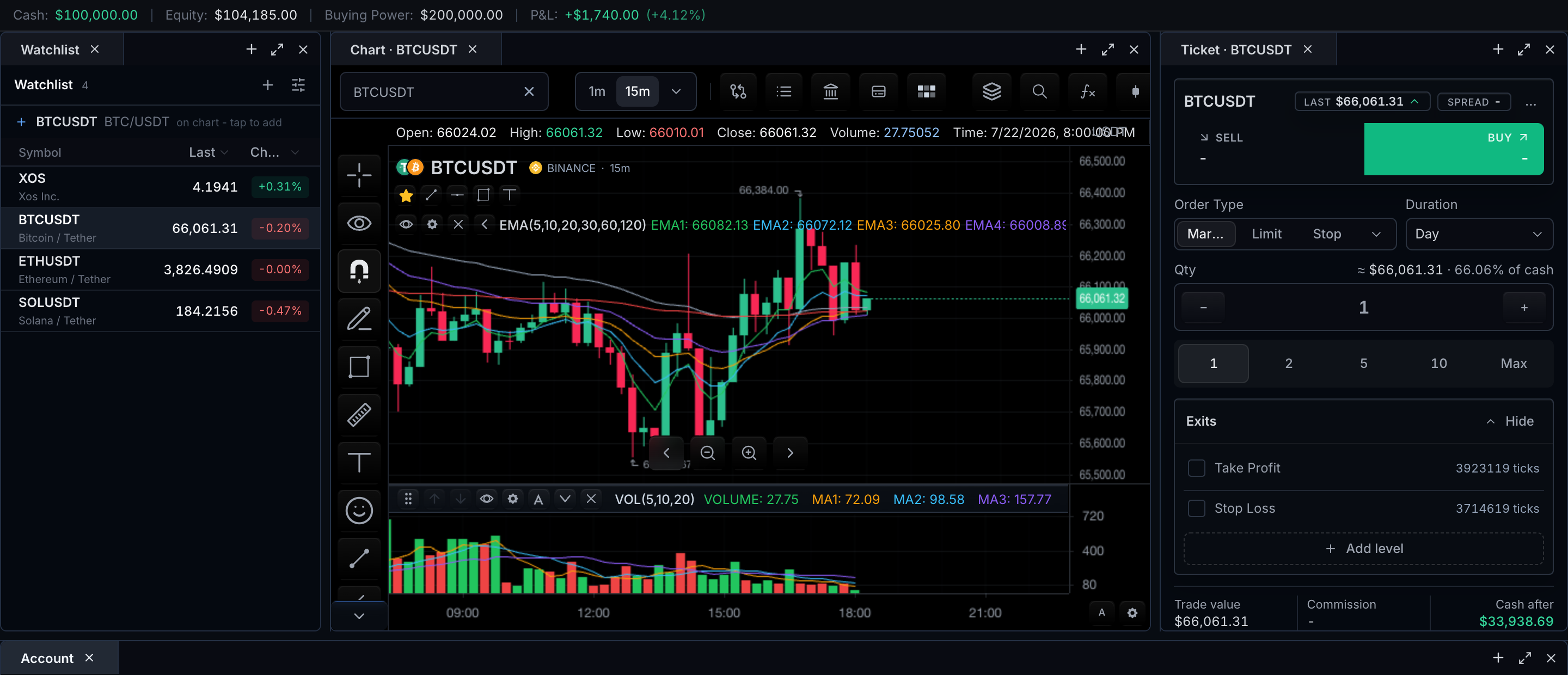
The watchlist is a symbol rail that drives the chart: selecting a row changes the active chart symbol through the normal symbol-selection path.
The chart toolbar includes a watchlist button when features.watchlist is not false and the datafeed advertises supportsWatchlist. Opening it loads the active list from MarketDataController.getWatchlist, subscribes to active-list updates with subscribeWatchlist, and renders the symbols as chart-selectable rows.
The open rail, shown above, is laid out top to bottom:
- An active-list selector, when the feed exposes more than one list.
- One row per symbol, carrying its label or ticker, venue metadata, and whichever quote fields the feed supplies.
- A selected state on the row matching the active chart symbol, so list focus and chart state stay synchronized.
Row anatomy and states
Each visible row field maps to its data source and interaction outcome:
| Row field or state | Source | Interaction outcome |
|---|---|---|
| Symbol, description, venue | Resolved symbol/search metadata | Enter selects and resolves the symbol |
| Last/change/status | Quotes and session status | Subscription updates the existing row |
| Selected row | Active chart symbol | Keeps chart and list focus synchronized |
| Empty list | Watchlist adapter | Show Add symbol; do not fabricate defaults |
| Loading | Watchlist/quote request | Preserve list identity and announce progress |
| Error/offline | Adapter or quote stream | Keep last known row values marked stale and offer retry |
Behavior by task
Select a list
If listWatchlists is available, the panel shows a list selector. Selecting a different list calls MarketDataController.setActiveWatchlist({ id }) and replaces the rows with the returned list. Set features.watchlist.multipleLists: false to hide the active-list selector even when the feed exposes multiple summaries.
Select a symbol
Selecting a symbol uses the normal setSymbol flow, including datafeed symbol resolution — the watchlist never bypasses resolution.
Receive quote and session updates
Rows update in place from the subscribeWatchlist subscription; quote and session data remain datafeed-owned. Updates modify the existing row rather than rebuilding the list, so selection and scroll position are preserved.
Add the chart symbol
Use chart.addSymbolToWatchlist(...) for chart-owned add behavior. It defaults to the current chart symbol and the active or default list, and emits watchlist-change once the datafeed accepts the change.
Options let you target an explicit symbol or list, insert at the top or bottom, attach an item label, group, or metadata, and select the added symbol.
The default add-symbol-to-watchlist shortcut action binds Alt+W and opens the watchlist rail after the datafeed update succeeds.
Operate by keyboard
Watchlist rows are keyboard-operable. ArrowDown/ArrowUp and Space/Shift+Space move through symbols, Enter activates the focused row, Shift+Arrow extends row selection, and Ctrl/Cmd+A selects all visible rows in host-composed WatchlistTable / BrokerWatchlist panels.
Configuration
const mounted = sdk.chart.mount({
  mount,
  symbol: { ticker: 'AAPL', exchange: 'NASDAQ' },
  interval: '1D',
  features: {
    watchlist: { multipleLists: true },
  },
  datafeed: {
    async onReady() {
      return { supportsWatchlist: true };
    },
    async getWatchlist() {
      return {
        id: 'default',
        name: 'Default',
        symbols: [
          { symbol: { ticker: 'AAPL', exchange: 'NASDAQ' }, label: 'Apple' },
          { symbol: { ticker: 'MSFT', exchange: 'NASDAQ' }, label: 'Microsoft' },
        ],
      };
    },
    subscribeWatchlist(_subscription, callback) {
      return () => {};
    },
  },
});
| Need | Surface |
|---|---|
| Remove the toolbar control | features.watchlist: false or features.watchlist: { enabled: false } |
| Advertise feed support | Datafeed capability supportsWatchlist |
| Load the active list | MarketDataFeed.getWatchlist |
| Stream list changes | MarketDataFeed.subscribeWatchlist |
| Enumerate lists | MarketDataFeed.listWatchlists |
| Switch the active list | MarketDataController.setActiveWatchlist({ id }) |
| Hide the list selector | features.watchlist.multipleLists: false |
| Add from the chart | chart.addSymbolToWatchlist(...) / Alt+W |
Data ownership and broker panels
The datafeed remains the source of truth for list storage, sharing, permissions, and cross-tab synchronization.
Host-composed side panels — including broker terminals that pair the watchlist with order and position surfaces — should use the exported BrokerWatchlist component, or the lower-level WatchlistTable, over the same data source. The broker panel and the built-in rail then stay synchronized through the same feed contracts.
Related pages
- Watchlist Widget — the host-composed widget surface.
- Symbol Search Surface — resolution behind every row selection.
- Market Status — the session state rows can display.