Snapshots
Snapshots are exported images of the chart or of the whole TradeScript widget. Export runs locally by default; snapshot.snapshotUrl or snapshot.adapter layers a server-backed share flow on top without removing the local download. Users reach both from the camera control in the top toolbar.
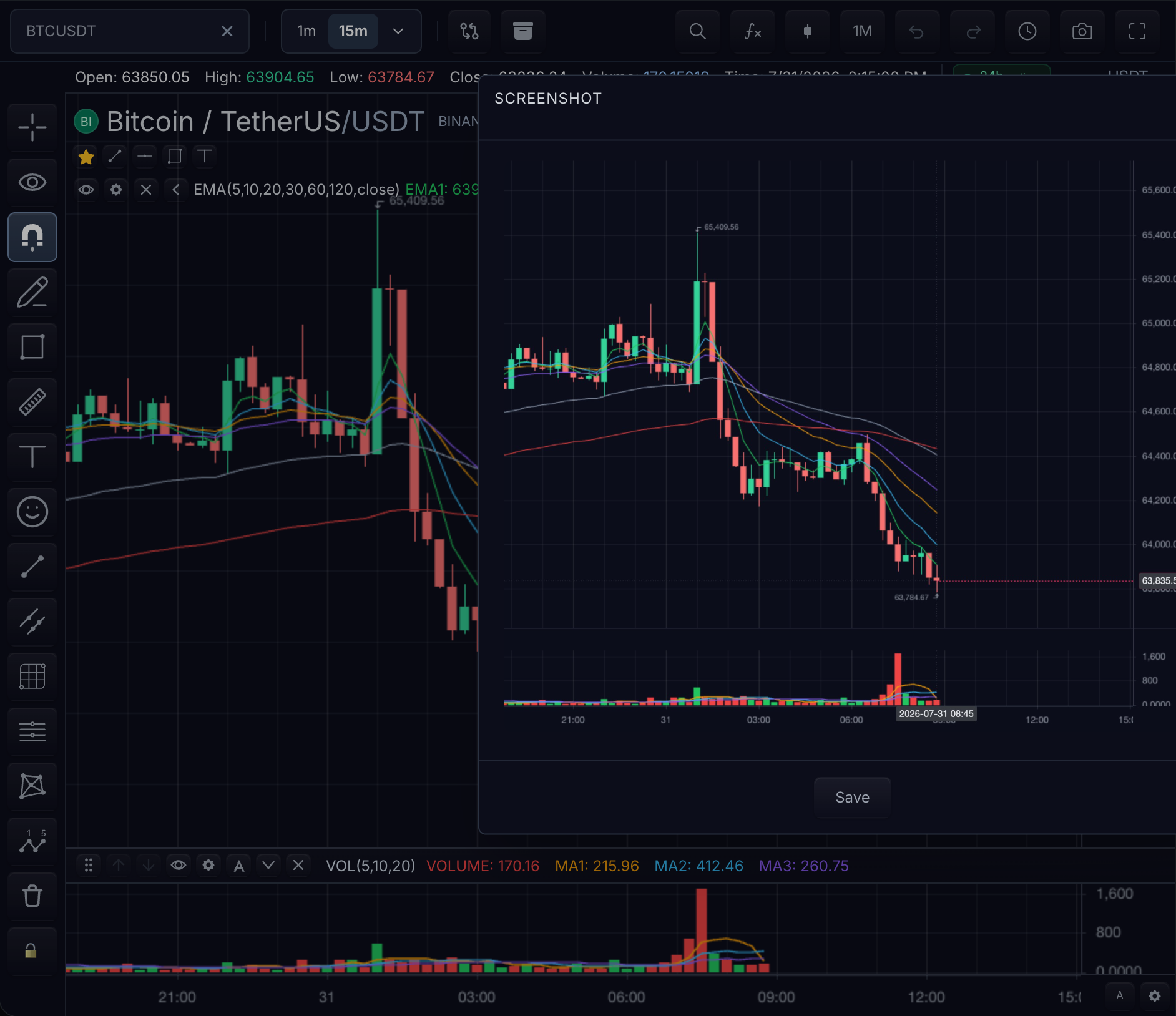
State shown: the snapshot menu open from the top-toolbar camera control on the BTCUSDT 15m chart in the dark theme.
Minimal example
One call produces the same chart artifact the built-in download action saves — the chart viewport with axes, grid, series, indicators, and (by default) drawings:
const image = chart.exportImage({
  format: 'png',
  includeDrawings: true,
  includeWatermark: true,
});
Limitations to know before coding
- Web Share and asynchronous clipboard access are browser-owned. They commonly require HTTPS or localhost, a user-initiated action, and browser permission. TradeScript treats those conditions as capability checks and falls back (share → copy URL → open in tab) rather than failing silently.
chart.copyImageToClipboard()rejects withsnapshot.clipboard-unsupportedwhen the browser cannot write image clipboard items.- Remote image watermarks must be loadable by the browser and CORS-readable for canvas export.
- Chart export never includes widget chrome; widget export never crawls surrounding host DOM.
Choose the capture
| Need | API | Included surface |
|---|---|---|
| Chart image | chart.exportImage() / exportImageAsync() | Chart canvas, configured overlays, optional watermark |
| Full TradeScript widget | widget.exportImage() | Toolbar, workspace tabs, chart container, and chart |
| Shareable URL | chart.uploadSnapshot() | Exported chart plus symbol/interval/chart metadata |
| Image clipboard | chart.copyImageToClipboard() | PNG through the browser clipboard capability |
Chart viewport inclusion rules
chart.exportImage(...) captures the current chart viewport at its current size.
- Main pane canvas content, axes, grid, series, and rendered indicators are included.
- Public chart export defaults
includeDrawingstotrue. includeDrawingsis the coarse overlay default. Set it tofalsefor a clean chart, or combine it withoverlayLayersto include selected native overlay classes.overlayLayers.drawings,annotations,orders,positions, andexecutionsinclude or exclude overlay-backed chart objects without changing live chart visibility. Drawing definitions can setobjectKindso host-owned overlays participate in the same export policy.overlayLayers.crosshair,tooltips, andpaneExtrascontrol interaction overlays, tooltip/crosshair labels, and non-object pane overlay extras independently.- TradeScript widget chrome is intentionally outside the chart viewport. Use
widget.exportImage()when the toolbar, workspace tabs, and chart container belong in the output.
const complianceImage = chart.exportImage({
  format: 'png',
  includeDrawings: false,
  overlayLayers: {
    orders: true,
    positions: true,
    executions: true,
    crosshair: false,
    tooltips: false,
  },
});
Format
format selects the encoded image type; the examples on this page use 'png'. backgroundColor fills the export background, and pixelRatio (widget export) scales the output resolution.
Branding
includeWatermark: truedraws the current native watermark into the exported bitmap. SynchronousexportImagesupports text and auto-composed watermarks;exportImageAsync,uploadSnapshot, andcopyImageToClipboardalso support image watermarks usingWatermarkSettings.imageUrl, position, opacity, max-width, and max-height. See Watermarks.WidgetImageExportOptions.composeis the host compositing hook. It receives the rendered widget canvas and a 2D context scaled to widget CSS-pixel coordinates, so the application can add pixels it owns before encoding:
const widgetImage = await widget.exportImage({
  format: 'png',
  pixelRatio: 2,
  compose({ context, width }) {
    context.fillStyle = '#94a3b8';
    context.fillText('Application account: Paper', width - 180, 18);
  },
});
Download and share
The built-in take-snapshot action keeps the local download flow. The built-in share-snapshot action uploads through chart.uploadSnapshot({ includeDrawings: true, includeWatermark: true }), then uses Web Share when available.
const uploaded = await chart.uploadSnapshot({
  format: 'png',
  includeDrawings: true,
  includeWatermark: true,
});
chart.uploadSnapshot(...) sends the exported image plus symbol, interval, chartId, layoutId, and merged snapshot metadata to the configured adapter or snapshotUrl. ChartWidgetOptions.snapshot.snapshotUrl posts the exported image and chart context to a server endpoint; ChartWidgetOptions.snapshot.adapter.uploadSnapshot lets hosts own the upload transport directly.
Errors and permissions
The share fallback chain preserves access to the uploaded snapshot URL:
- Web Share opens when the browser allows it.
- If Web Share is unavailable or fails because of browser permission or activation policy, the uploaded URL is copied to the clipboard.
- If clipboard writing is also unavailable or rejected, the uploaded URL opens in a new tab.
- An explicit Web Share cancellation stops the action without copying or opening anything.
chart.copyImageToClipboard() writes the PNG itself through ClipboardItem. It rejects with snapshot.clipboard-unsupported when the browser cannot write image clipboard items; applications can keep the built-in download action available alongside it.
Export ownership
The image APIs follow the same ownership boundaries as the rendered product:
chart.exportImage()andchart.exportImageAsync()export the chart engine viewport.widget.exportImage()exports the complete TradeScript-owned widget root, including its toolbar, workspace tabs, chart container, and multi-chart layout.- The widget API does not crawl or capture arbitrary surrounding host DOM. Applications that need browser navigation, application dialogs, or other shell UI choose those pixels explicitly through
composeor an application-level screenshot workflow.
Backend-specific examples and permission-error UX copy can be added as integration polish.
Related pages
- Watermarks — the branding layer exports can include.
- Chart Data Table — tabular export rather than image export.
- Toolbars — where the camera control lives.