Context Menu
The context menu is the right-click (or keyboard-invoked) menu the chart shows over its panes, objects, and scales. The model is typed and action-based: item processors and renderer hooks let hosts add, filter, or fully re-render items without losing the menu's built-in awareness of what was clicked.
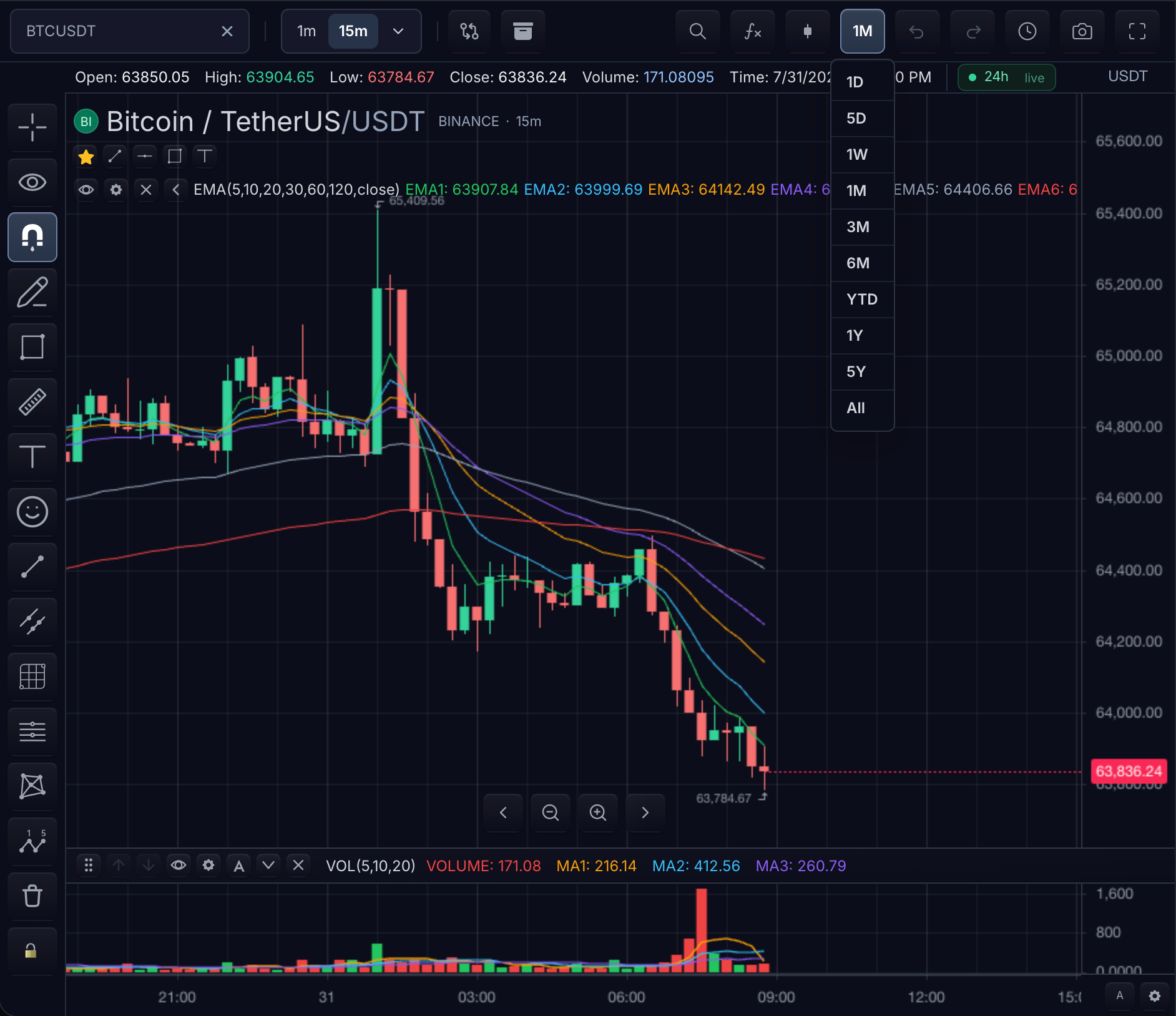
State shown: the chart context menu open over the main pane of the BTCUSDT 15m chart in the dark theme.
Menu states by target
Each menu state defines its trigger, target, available actions, customization boundary, and keyboard access.
Chart pane
- Trigger: right-click or the keyboard context-menu command over empty chart space.
- Target: the invocation point — local pixel point, projected time, bar index, and price.
- Available actions: chart actions only, plus registered host actions projected to
'context-menu'. - Customization boundary: hosts add items through
registerActionand filter or reorder throughitemsProcessor; built-in chart actions remain SDK-owned. - Keyboard access: focus enters the menu on open; Escape returns focus to the trigger.
Drawing or marker
- Trigger: right-click the object.
- Target: the object plus its projected chart coordinates.
- Available actions: object actions such as inspect, settings, or remove, plus host actions the
itemsProcessorallows for that object kind. - Customization boundary:
context.objectidentifies the target so processors can scope host items (for example, drawing-only actions). - Keyboard access: focus a chart object and invoke its context menu; Escape returns focus to the object.
Price scale
- Trigger: right-click the price axis.
- Target: the scale and the projected price.
- Available actions: scale modes, reset, and configured price actions.
- Customization boundary:
scaleContextMenuVisible: falsehides the built-in scale-context section without disabling the chart pane context menu or the broader price-action menu. - Keyboard access: same enter/Escape focus contract as the other targets.
Customize the menu
const ui = chart.customization();

const dispose = ui.registerAction({
  id: 'host.inspect-object',
  label: 'Inspect object',
  placements: ['context-menu'],
  run(context) {
    console.log(context.object, context.point, context.time, context.barIndex, context.price);
  },
});

ui.setContextMenu({
  enabled: true,
  scaleContextMenuVisible: true,
  actionIds: ['host.inspect-object'],
  itemsProcessor(items, context) {
    return context.object?.kind === 'drawing'
      ? items
      : items.filter((item) => item.id !== 'host.inspect-object');
  },
});
- Register actions with
registerActionand project them throughContextMenuCustomization. - Filter or reorder known items through
itemsProcessor. - Supply host-owned rendering through
ContextMenuCustomization.renderer.
Use processor hooks to filter or render the menu items and object context supplied by TradeScript. Keep business rules in the application service that owns them.
Action context fields
The context passed to itemsProcessor, renderer, custom item run, and registered action run includes:
| Field | Meaning |
|---|---|
chart | The chart API instance. |
object | The hovered chart object when one is available. |
point | Local chart pixel point for the menu invocation. |
time | Data-space timestamp projected from point, when available. |
barIndex | Data index projected from point, when available. |
price | Price/value projected from point, when available. |
Configuration
| Need | Surface |
|---|---|
| Disable the built-in right-click menu | features.contextMenu: false |
| Remove host-registered actions from SDK-rendered projection | features.actions: false (built-in shortcuts stay under features.shortcuts) |
| Enable/disable at the customization layer | ContextMenuCustomization.enabled |
| Hide the built-in scale-context section | scaleContextMenuVisible: false |
| Project specific host actions | ContextMenuCustomization.actionIds |
| Filter or reorder items | ContextMenuCustomization.itemsProcessor |
| Replace rendering entirely | ContextMenuCustomization.renderer |
Related pages
- Toolbars — the other placement registered actions can project to.
- Object Tree — object management outside the per-object menu.
- Price Scale — the scale modes the axis menu exposes.