Customize the order ticket
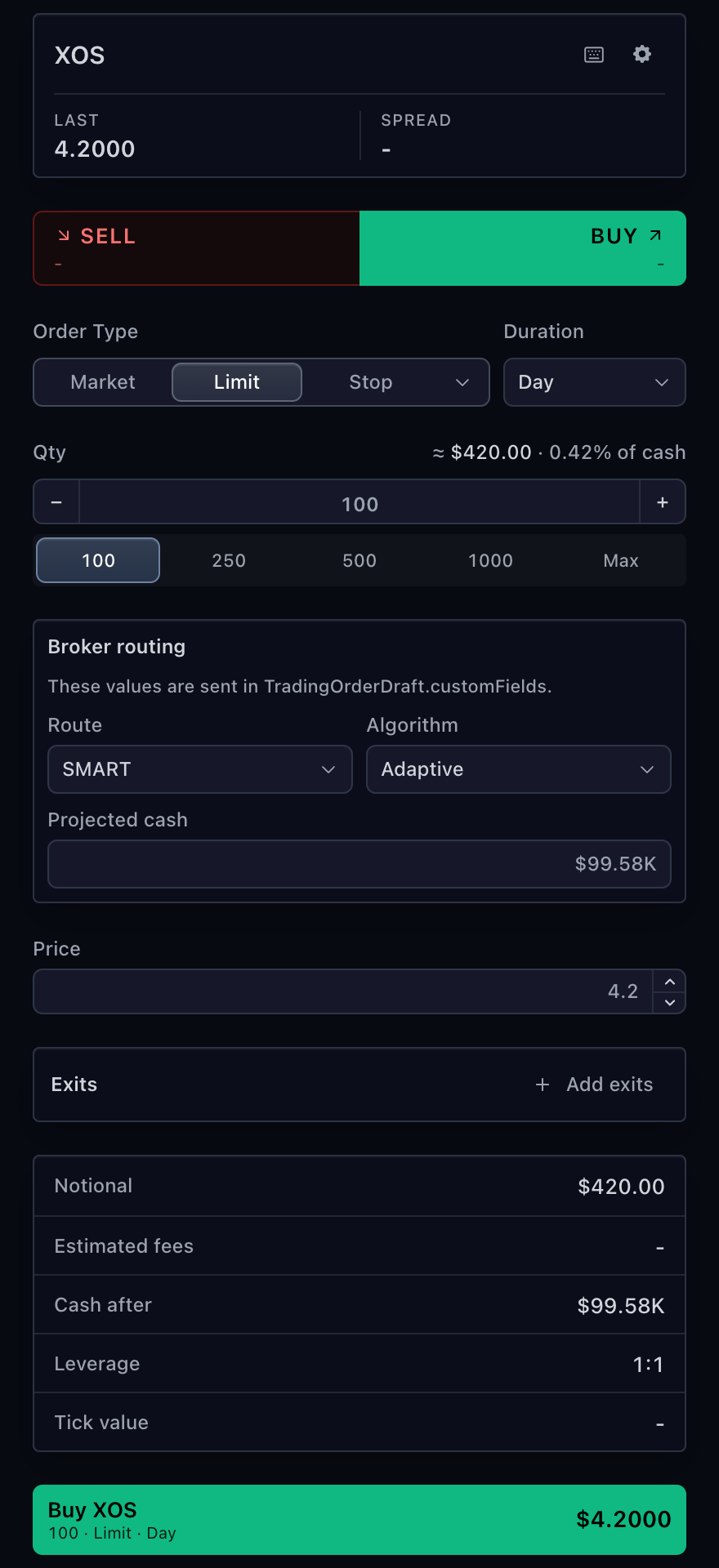
TradeScript order tickets separate execution semantics from presentation. The
broker declares order rules and fieldLayout. The SDK owns draft state,
validation, standard controls, and submission. The host applies theme, wording,
and React presentation extensions.
Minimal field layout
This layout writes one route value to
TradingOrderDraft.customFields.route after the quantity field.
import type { TradingOrderTicketFieldLayout } from '@tradescript/pro/sdk';

export const fieldLayout = {
  sections: [{
    id: 'routing',
    title: 'Routing',
    placement: 'after-quantity',
    fields: [{
      id: 'route',
      kind: 'select',
      label: 'Route',
      binding: { target: 'customFields', field: 'route' },
      defaultValue: 'SMART',
      options: [
        { value: 'SMART', label: 'SMART' },
        { value: 'ARCA', label: 'ARCA' },
      ],
    }],
  }],
} satisfies TradingOrderTicketFieldLayout;
Return it from getTradingSymbolInfo().orderTicketSettings.fieldLayout, or
pass it through the ticket's host options. The placed draft carries the exact
custom-field key and selected value.
Field kinds and bindings
| Kind | Control | Typical use |
|---|---|---|
text | Text input | Client tag or free-form broker value |
number | Numeric input | Numeric broker parameter |
price | Price input | Broker-owned price field |
quantity | Quantity input | Display or reserve quantity |
select | Dropdown | Route or execution algorithm |
segmented | Visible button group | Small mutually exclusive choice |
checkbox | Checkbox | Boolean order flag |
readonly | Calculated display | Trade value, fees, cash, margin, or leverage |
Editable fields bind either to a supported draft property or to one explicit
customFields key. The schema is serializable and does not accept React
renderers.
type TradingOrderTicketFieldBinding =
  | {
      target: 'draft';
      field: 'quantity' | 'price' | 'stopPrice' | 'trailPercent'
        | 'relativeOffset' | 'duration' | 'postOnly';
    }
  | { target: 'customFields'; field: string };
Sections and conditions
Sections are ordered and mount at after-order-type, after-quantity,
before-exits, after-exits, or before-submit. Use one to three columns.
Fields can declare visibleWhen, enabledWhen, requiredWhen, min, max,
and step:
import type { TradingOrderTicketFieldDefinition } from '@tradescript/pro/sdk';

const displayQuantity = {
  id: 'display-quantity',
  kind: 'quantity',
  label: 'Display quantity',
  binding: { target: 'customFields', field: 'displayQuantity' },
  min: 1,
  step: 1,
  visibleWhen: {
    source: 'customField',
    field: 'route',
    equals: 'SMART',
  },
  enabledWhen: {
    source: 'orderType',
    oneOf: ['limit', 'iceberg'],
  },
  disabledReason: 'Display quantity requires a limit or iceberg order.',
} satisfies TradingOrderTicketFieldDefinition;
Conditions can use order type, side, symbol type, position presence, account
margin support, and exact custom-field values. They compose with all, any,
and not. Declared constraints run before preview or placement.
Calculated rows
readonly fields display SDK-calculated values without copying calculation
logic into the host:
import type { TradingOrderTicketReadonlyField } from '@tradescript/pro/sdk';

export const projectedCash = {
  id: 'projected-cash',
  kind: 'readonly',
  label: 'Cash after',
  source: 'cashAfter',
  format: 'money',
} satisfies TradingOrderTicketReadonlyField;
Sources include prices, quantity, trade value, commission, cash, buying power,
margin, tick value, and leverage. Missing facts render as -, not zero.
Canonical and broker-native order types
Keep normalized meaning separate from provider identity:
import type { TradingOrderTypeRule } from '@tradescript/pro/sdk';

const stopMarket: TradingOrderTypeRule = {
  type: 'stop',
  brokerOrderTypeId: 'STP-MKT',
  label: 'Stop-MKT',
  requiresStopPrice: true,
};
TradingOrderDraft.type remains the canonical type used by SDK validation and
risk. brokerOrderTypeId travels beside it for adapter mapping. Use
disabledReason when a known type is temporarily unavailable.
Configuration precedence
| Contract | Lowest to highest precedence |
|---|---|
| Capabilities | Account, then exact symbol rules |
| Ticket settings | Account, symbol, host options, allowed user preferences |
fieldLayout | Account, symbol, host options |
| Legacy custom fields | Account legacy/settings, symbol legacy/settings, host options.customFields |
Persisted user settings can change only the typed preference allowlist. They cannot replace order rules, provider ids, or broker-owned field semantics.
These settings merge only at the top level. fieldLayout is a whole-value,
shallow replacement: a symbol layout replaces the account layout, and a host
layout replaces both. Sections and fields from lower-precedence layouts are not
deep-merged. Put the complete intended layout at the winning level.
User settings and appearance
The ticket's built-in settings modal persists only the typed user-setting
allowlist. Implement getOrderTicketSettings and setOrderTicketSettings on
the trading adapter to load and save those values in the selected account and
exact-symbol scope.
TradingTicketAppearanceSettings currently exposes the margin meter colors:
import type { TradingTicketAppearanceSettings } from '@tradescript/pro/sdk';

const appearance: TradingTicketAppearanceSettings = {
  marginAvailableColor: '#22c55e',
  marginMeterTrackColor: '#172033',
};
Pass the same serializable contract through the ticket's options.appearance
when the host supplies a default. Persisted user settings take precedence over
that default. Use theme and slotStyles for host-owned presentation that
must not be stored as a user preference.
Return symbol-specific configuration from the adapter:
import type {
  TradingOrderContext,
  TradingOrderTicketFieldLayout,
  TradingSymbolInfo,
} from '@tradescript/pro/sdk';

declare const fieldLayout: TradingOrderTicketFieldLayout;

async function getTradingSymbolInfo(
  context: TradingOrderContext,
): Promise<TradingSymbolInfo> {
  return {
    symbol: context.symbol,
    accountId: context.accountId,
    supportedOrderRules: [
      { type: 'market', brokerOrderTypeId: 'MKT', label: 'Market' },
      { type: 'limit', brokerOrderTypeId: 'LMT', label: 'Limit', requiresLimitPrice: true },
    ],
    supportedDurations: [
      { type: 'day', label: 'Day' },
      { type: 'gtc', label: 'GTC' },
    ],
    orderTicketSettings: { fieldLayout },
  };
}
Host presentation
Use semantic configuration for broker facts and React props for appearance:
| Need | Surface |
|---|---|
| Theme and density | theme, className, style |
| Built-in wording | labels |
| Direction layout | directionSelector |
| Impact rows | orderInfo.items |
| One control style | slotClassNames, slotStyles |
| Complete region markup | renderDirectionSelector, renderOrderInfo |
import type {
  SdkSymbolInfo,
  TradeScriptSdkProducts,
  TradingControllerApi,
  TradingOrderTicketFieldLayout,
} from '@tradescript/pro/sdk';
import { TradingOrderTicket } from '@tradescript/pro/react/widgets/order-ticket';

declare const sdk: TradeScriptSdkProducts;
declare const trading: TradingControllerApi;
declare const symbol: SdkSymbolInfo;
declare const fieldLayout: TradingOrderTicketFieldLayout;

<TradingOrderTicket
  sdk={sdk}
  controller={trading}
  symbol={symbol}
  currentPrice={214.4}
  options={{ fieldLayout }}
  labels={{ tradeValue: 'Notional', commission: 'Fees' }}
  slotStyles={{ submitButton: { minHeight: 44, fontWeight: 700 } }}
/>
Import TradingOrderTicketProps and the field-layout types instead of copying
slot or schema inventories into application code.
Migrate legacy fields
Legacy customFields remain supported. Move a field to fieldLayout when it
needs section placement, numeric constraints, conditions, segmented controls,
or calculated rows. Keep the same custom-field binding key and never declare
one destination in both systems.
Verify the integration
- Every field appears only under its declared condition.
- The winning
fieldLayoutcontains every intended section; no lower-level sections leak into it. - Local constraints block preview and placement with a useful message.
- The placed draft contains exact canonical and broker-native order identities.
- User preferences cannot override broker rules or field meaning.
- Missing calculated values remain unavailable instead of becoming zero.
Next steps
- Order Ticket — mount and submit the configured form.
- Accounts, capabilities, and symbol rules — publish symbol and account rules.
- Trading API reference — inspect the complete field and slot types.