Order Ticket
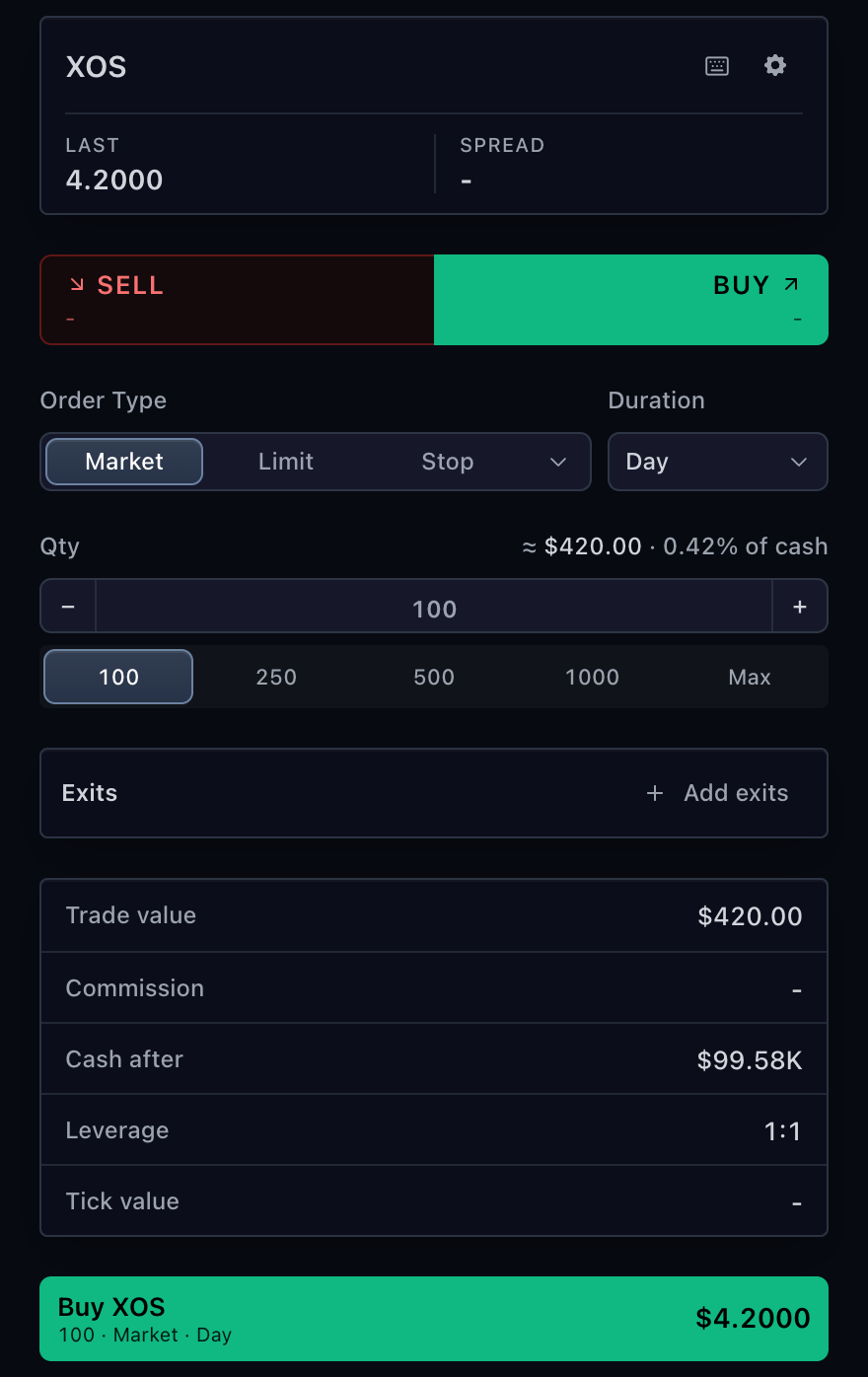
TradingOrderTicket is the React adapter for standard stock, fund, forex,
futures, and crypto order entry. It reads state and trading rules from
TradingControllerApi, then submits one TradingOrderDraft through that same
controller. For a framework-neutral mount, use sdk.orderTicket.mount(...) as
shown in Order entry.
Use Option order ticket for option legs and Prediction-market order ticket for event outcomes.
Minimal ticket
Pass the exact symbol returned by market-data resolution. Do not rebuild it
from ticker text in the ticket layer. The adapter behind trading must declare
at least one supported order type and duration for the selected account and
symbol.
import type {
  MarketDataControllerApi,
  TradeScriptSdkProducts,
  TradingControllerApi,
} from '@tradescript/pro/sdk';
import { TradingOrderTicket } from '@tradescript/pro/react/widgets/order-ticket';

declare const sdk: TradeScriptSdkProducts;
declare const marketData: MarketDataControllerApi;
declare const trading: TradingControllerApi;

const symbol = await marketData.resolveSymbol('AAPL');

export function OrderEntry() {
  return (
    <TradingOrderTicket
      sdk={sdk}
      controller={trading}
      symbol={symbol}
      currentPrice={214.4}
      defaultQuantity={1}
      quickQuantities={[1, 5, 10, 25]}
    />
  );
}
Reuse one controller across the chart, ticket, and Account Manager for the same broker session. Unmounting this component does not destroy that controller.
User flow
When supported, the ticket loads rules through
getTradingSymbolInfo(context). Preview uses
previewOrder(draft, context); submission uses
placeOrder(draft, context).
The chart and account tables update when the adapter publishes authoritative
order state. onOrderAccepted is an acknowledgement callback, not a durable
order-state source.
Broker-owned rules
getTradingSymbolInfo(context) can declare:
- quantity minimums and steps
- price steps and precision
- canonical and broker-native order types
- supported durations
- brackets and exit limits
- symbol/account ticket settings
- a declarative
fieldLayout
The ticket does not invent order-type or duration availability. Quantity and
price inputs have presentation defaults when step facts are absent, but those
defaults are not broker authorization. Keep provider mapping in the adapter and
send the canonical type beside any brokerOrderTypeId.
import type { TradingOrderContext, TradingSymbolInfo } from '@tradescript/pro/sdk';

async function getTradingSymbolInfo(
  context: TradingOrderContext,
): Promise<TradingSymbolInfo> {
  return {
    symbol: context.symbol,
    accountId: context.accountId,
    minQuantity: 1,
    quantityStep: 1,
    priceStep: 0.01,
    supportedOrderRules: [
      { type: 'market', brokerOrderTypeId: 'MKT', label: 'Market' },
      { type: 'limit', brokerOrderTypeId: 'LMT', label: 'Limit', requiresLimitPrice: true },
    ],
    supportedDurations: [
      { type: 'day', label: 'Day' },
      { type: 'gtc', label: 'GTC' },
    ],
  };
}
See Order Ticket Configuration when the broker needs extra fields, conditions, calculated rows, or persisted preferences.
Preview and placement
previewOrder is optional for the generic ticket. When it is available, choose
one preview mode:
| Mode | Behavior |
|---|---|
none | Submit after local validation. The backend still performs final validation. |
background | Debounce advisory preview facts as the draft changes. The latest rejection blocks submission, but submission does not re-preview the current draft. |
dialog | Require the user to accept the current preview before placement. |
Preview results can include sections, estimated costs, warnings, errors, and a
confirmId. The backend must revalidate placement; a preview is never an
authorization token by itself. Use dialog when the user must review the exact
draft that will be placed.
<TradingOrderTicket
  sdk={sdk}
  controller={trading}
  symbol={symbol}
  currentPrice={214.4}
  orderPreviewMode="dialog"
  messageAutoDismissMs={false}
  onOrderAccepted={(orderId) => {
    console.info('Placement acknowledged', orderId);
  }}
/>
Transport failures and timeouts have an unknown outcome. Keep the error visible and reconcile the order stream before offering a retry.
Attach exits
The ticket can attach take-profit and protective stop levels to the entry. The effective account and exact-symbol rules control what the user can enter:
| Rule | Effect |
|---|---|
supportsStopLoss | Declares protective-stop support; omitted currently resolves as supported. |
supportsMarketBrackets | Allows exits on a market entry; limit and stop entries do not need this flag. |
supportsTrailingStop, supportsGuaranteedStop | Adds those protective-stop kinds. |
supportsMultipleExitLevels, maxExitLevels | Enables a quantity ladder and limits its level count. |
supportsUnpairedExitLevels: false | Requires take-profit and stop-loss legs to be paired at each level. |
When the user enables exits, the placed TradingOrderDraft carries
exits.levels. Every level has a stable id, the covered quantity, and an
optional takeProfit and stopLoss. The adapter must preserve those identities
when it creates and later publishes the broker's parent and child orders.
import type {
  SdkSymbolInfo,
  TradingAccountId,
  TradingSymbolInfo,
} from '@tradescript/pro/sdk';

declare const symbol: SdkSymbolInfo;
declare const accountId: TradingAccountId;

const symbolRules: TradingSymbolInfo = {
  symbol,
  accountId,
  supportedOrderTypes: ['market', 'limit'],
  supportedDurations: [{ type: 'day', value: 'day' }],
  supportsStopLoss: true,
  supportsMarketBrackets: true,
  supportsMultipleExitLevels: true,
  supportsUnpairedExitLevels: false,
  maxExitLevels: 3,
};
Ticket validation is presentation-time protection only. Preview and placement must revalidate prices, quantities, supported stop kinds, and total covered quantity at the broker boundary. Publish dormant and activated bracket children through authoritative order state; do not synthesize them after acknowledgement.
Modify an order
Pass the current broker-owned TradingOrder through modifyOrder. The ticket
prefills the editable fields and submits a TradingOrderPatch through
modifyOrder(orderId, patch, context).
<TradingOrderTicket
  sdk={sdk}
  controller={trading}
  symbol={workingOrder.symbol}
  modifyOrder={workingOrder}
  currentPrice={214.4}
  onModifyAccepted={(orderId) => console.info('Modification acknowledged', orderId)}
/>
Render modify mode only when trading.getOperationSupport().modifyOrder is
true. The next broker snapshot remains authoritative.
Presentation
Keep broker semantics in TradingSymbolInfo and use React props only for this
mounted ticket's presentation:
| Need | Prop |
|---|---|
| Match the chart | theme |
| Rename built-in text | labels |
| Change Buy/Sell layout | directionSelector |
| Choose impact rows | orderInfo.items |
| Style one control | slotClassNames, slotStyles |
| Replace a React region | renderDirectionSelector, renderOrderInfo |
Unavailable calculated values render as -; they are not converted to zero.
The complete field-layout and host-presentation example is in
Customize the order ticket. Import
TradingOrderTicketProps rather than copying the prop contract.
Configure order-impact rows
Use orderInfo.items to choose, order, and label SDK-calculated rows or add
host-owned values. The shared React presentation type is named
BrokerOrderTicketOrderInfoOptions; it does not introduce another broker
adapter or state contract.
import type {
  SdkSymbolInfo,
  TradeScriptSdkProducts,
  TradingControllerApi,
} from '@tradescript/pro/sdk';
import {
  TradingOrderTicket,
  type BrokerOrderTicketOrderInfoOptions,
} from '@tradescript/pro/react/widgets/order-ticket';

declare const sdk: TradeScriptSdkProducts;
declare const trading: TradingControllerApi;
declare const symbol: SdkSymbolInfo;
declare const customer: { accountTier: string };

<TradingOrderTicket
  sdk={sdk}
  controller={trading}
  symbol={symbol}
  orderInfo={{
    items: [
      { id: 'notional', source: 'tradeValue', label: 'Order value' },
      { id: 'fees', source: 'commission', label: 'Fees' },
      { id: 'cash', source: 'cashAfter', label: 'Cash remaining' },
      { id: 'tier', label: 'Account tier', value: customer.accountTier },
    ],
  } satisfies BrokerOrderTicketOrderInfoOptions}
  renderOrderInfo={({ defaultContent }) => (
    <aside aria-label="Estimated order impact">
      {defaultContent}
      <p>Estimates may change before execution.</p>
    </aside>
  )}
/>;
renderOrderInfo is the full-region escape hatch. Return defaultContent to
wrap the configured rows, replace it with host markup, or remove the whole
region explicitly:
renderOrderInfo={() => null}
These values are read-only presentation inputs. Preview and placement still revalidate the order at the broker boundary.
Verify the integration
- The visible order types, durations, and steps match the selected account and symbol.
- In
dialogmode, changing the draft requires a new accepted preview. - In
backgroundmode, a latest rejected preview blocks placement and shows the broker message. - A rejected placement creates no local order record.
- An accepted placement appears only after an
ordersorstateupdate. - Switching symbols retains exact provider and broker identity.
Next steps
- Order Ticket Configuration — add broker-defined fields and dependencies.
- Order entry — compare the standard, option, and prediction-market surfaces.
- Orders — publish the lifecycle after placement.
- Broker integration — implement the rules, state, and mutation methods the ticket calls.