Option order ticket
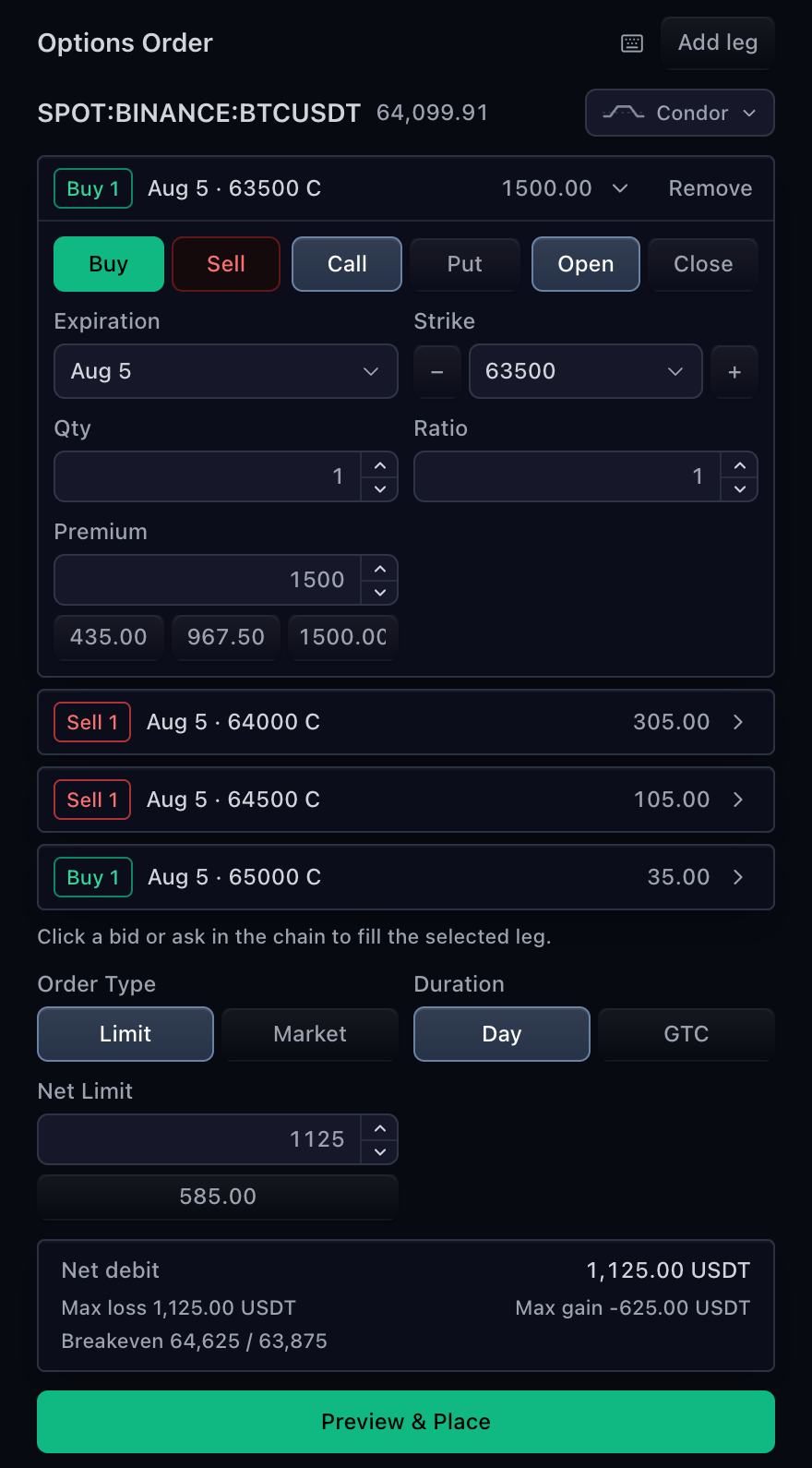
OptionOrderTicket builds TradingOrderDraft.optionLegs for single contracts
and multi-leg strategies. It uses two explicit authorities:
MarketDataControllerApisupplies the underlying, contracts, quotes, Greeks, expirations, and strikes.TradingControllerApisupplies accounts, optional broker contract resolution, preview, placement, and authoritative state.
The React component comes from
@tradescript/pro/react/widgets/option-order-ticket. Use
sdk.optionOrderTicket.mount(...) for the equivalent framework-neutral surface.
Minimal ticket
Resolve the underlying through the same market-data controller used by the chart. The ticket requires broker preview before placement.
import type {
  MarketDataControllerApi,
  TradeScriptSdkProducts,
  TradingControllerApi,
} from '@tradescript/pro/sdk';
import { OptionOrderTicket } from '@tradescript/pro/react/widgets/option-order-ticket';

declare const sdk: TradeScriptSdkProducts;
declare const marketData: MarketDataControllerApi;
declare const trading: TradingControllerApi;

const underlying = await marketData.resolveSymbol('AAPL');

export function OptionEntry() {
  return (
    <OptionOrderTicket
      sdk={sdk}
      trading={trading}
      marketData={marketData}
      underlying={underlying}
      exchange="SMART"
      currentPrice={214.4}
      defaultExpiration="2026-08-21"
      defaultStrike={215}
      defaultQuantity={1}
    />
  );
}
Implement previewOrder and placeOrder on the broker adapter. Without
preview, this surface fails closed and does not call placement.
Contract flow
When option-chain data is available, the ticket calls
getOptionContracts({ symbol }) for the catalog and
getOptionQuotes({ symbol, expiration }) for the selected expiry. Users can
still enter typed legs manually when those optional market-data methods are not
available.
Each TradingOptionContract carries its complete
underlyingSymbolInfo. Do not reconstruct a contract from its formatted code,
strike label, or underlying ticker.
Required and optional capabilities
| Capability | Requirement | Result when absent |
|---|---|---|
previewOrder | Required | Placement stays disabled. |
placeOrder | Required | The adapter contract is invalid. |
resolveOptionContract | Optional | Exact market-data contracts pass through without broker enrichment. |
getTradingSymbolInfo | Optional | Underlying exchange, contract multiplier, and shared ticket settings use defaults. |
getOptionContracts, getOptionQuotes | Optional for manual legs | Chain-driven choices and quote fills are unavailable; typed fields remain editable. |
Implement resolveOptionContract when the venue requires a native contract id,
route, exchange, or currency:
import type {
  TradingOptionContract,
  TradingOptionContractResolution,
  TradingResolveOptionContractRequest,
} from '@tradescript/pro/sdk';

declare const backend: {
  resolveOption(
    contract: TradingOptionContract,
    options: { accountId?: string },
  ): Promise<{
    contractId?: string;
    exchange?: string;
    route?: string;
    tradable?: boolean;
    reason?: string;
  }>;
};

async function resolveOptionContract(
  request: TradingResolveOptionContractRequest,
): Promise<TradingOptionContractResolution> {
  const result = await backend.resolveOption(request.contract, {
    accountId: request.accountId,
  });
  return {
    contract: {
      ...request.contract,
      ...(result.contractId === undefined ? {} : { brokerContractId: result.contractId }),
      ...(result.exchange === undefined ? {} : { exchange: result.exchange }),
      ...(result.route === undefined ? {} : { route: result.route }),
    },
    tradable: result.tradable,
    reason: result.reason,
  };
}
A tradable: false result blocks the leg and surfaces its reason. This surface
does not call isTradable; backend preview remains the final venue and risk
check when contract resolution is absent.
One-action preview and placement
The button is one action, not a two-screen confirmation flow. It builds and
optionally resolves every leg, validates close legs, calls previewOrder, and
calls placeOrder immediately only when that preview is accepted. A rejected
preview never reaches placement.
Use broker preview for strategy-level checks, estimated fees, margin, and venue
validation. Placement must repeat every financial check because preview is not
authorization. onOrderAccepted reports only an accepted placement; canonical
orders and fills still arrive through broker state.
Declare order choices
The option ticket defaults to Market and Limit with DAY and GTC. It does not
derive those choices from getTradingSymbolInfo. Narrow or relabel them through
options, then enforce the same policy in broker preview and placement.
<OptionOrderTicket
  sdk={sdk}
  trading={trading}
  marketData={marketData}
  underlying={underlying}
  options={{
    orderTypes: [{ value: 'limit', label: 'Limit' }],
    durations: [{ value: 'day', label: 'Day' }],
  }}
/>
Connect the option chain
OptionChainLadder is the browsing surface. OptionOrderTicket is the draft,
risk, preview, and placement surface. Keep both on the same market-data and
trading controller identities.
import { useState } from 'react';
import type {
  MarketDataControllerApi,
  SdkSymbolInfo,
  TradeScriptSdkProducts,
  TradingControllerApi,
  TradingOptionContract,
} from '@tradescript/pro/sdk';
import { OptionChainLadder } from '@tradescript/pro/react/widgets/option-chain';
import { OptionOrderTicket } from '@tradescript/pro/react/widgets/option-order-ticket';

declare const sdk: TradeScriptSdkProducts;
declare const trading: TradingControllerApi;
declare const marketData: MarketDataControllerApi;
declare const underlying: SdkSymbolInfo;

export function OptionWorkspace() {
  const [selectedContract, setSelectedContract] = useState<TradingOptionContract>();
  const [selectedPremium, setSelectedPremium] = useState<number>();
  const [selectedContractKey, setSelectedContractKey] = useState(0);

  return (
    <>
      <OptionChainLadder
        sdk={sdk}
        trading={trading}
        marketData={marketData}
        underlying={underlying}
        exchange="SMART"
        currentPrice={214.4}
        onContractSelect={(selection) => {
          if (selection.price === undefined) return;
          setSelectedContract(selection.contract);
          setSelectedPremium(selection.price);
          setSelectedContractKey((key) => key + 1);
        }}
      />
      <OptionOrderTicket
        sdk={sdk}
        trading={trading}
        marketData={marketData}
        underlying={underlying}
        selectedContract={selectedContract}
        selectedPremium={selectedPremium}
        selectedContractKey={selectedContractKey}
      />
    </>
  );
}
The guard rejects a chain selection without a quoted premium. Otherwise the ticket would retain the previous leg premium while switching contract identity.
See Option Chains for contract-series fields, quotes, custom metrics, and columns.
Multi-leg strategies
The ticket keeps each leg explicit: side, call or put, position effect, expiration, strike, quantity, ratio, premium, and exact contract identity. It can identify common structures and calculate closed-form risk where available.
For an iron condor, submit four opening legs with one expiration:
| Leg | Side | Right | Strike |
|---|---|---|---|
| 1 | Sell | Call | 225 |
| 2 | Buy | Call | 230 |
| 3 | Sell | Put | 200 |
| 4 | Buy | Put | 195 |
The broker preview receives all four resolved legs in one draft. Preserve leg order and identity through preview, placement, and reconciliation.
Close existing contracts
Set a leg's positionEffect to close only when it reduces an existing option
position. Before preview, the ticket matches the leg's exact resolved contract
against the current selected-account positions and rejects a close quantity
larger than that position.
This client-side check prevents obvious stale or mismatched drafts. The broker
must repeat the check atomically because positions can change between the state
snapshot, preview, and placement. Opening legs use positionEffect: 'open';
do not infer the effect from Buy or Sell. The local check does not reserve
quantity across duplicate close legs or pending close orders, so the broker must
enforce aggregate availability.
Customize without forking
Use options.legs for leg-count policy, sections for host-owned controls at
stable placements, and renderRegion only when a complete React region must be
wrapped or replaced.
Order-level custom values go to TradingOrderDraft.customFields. Leg-level
values remain on the exact TradingOptionContract.customFields for that leg.
Verify the integration
- Chain selections preserve exact contract and underlying identities.
- Every leg preserves the exact market-data contract through preview and placement.
- When
resolveOptionContractis supported, every leg resolves first andtradable: falseblocks it with the broker reason. - A close leg fails before preview when the selected account has no matching contract position or insufficient quantity.
- One click calls placement only after the current draft's preview succeeds.
- The placed draft matches the accepted preview leg for leg.
Next steps
- Option Chains — supply contracts, quotes, Greeks, and custom metrics.
- Order entry — compare this one-action flow with the other ticket surfaces.
- Orders — publish the resulting order lifecycle.
- Broker integration — implement preview, placement, and optional contract resolution.