Chart trading
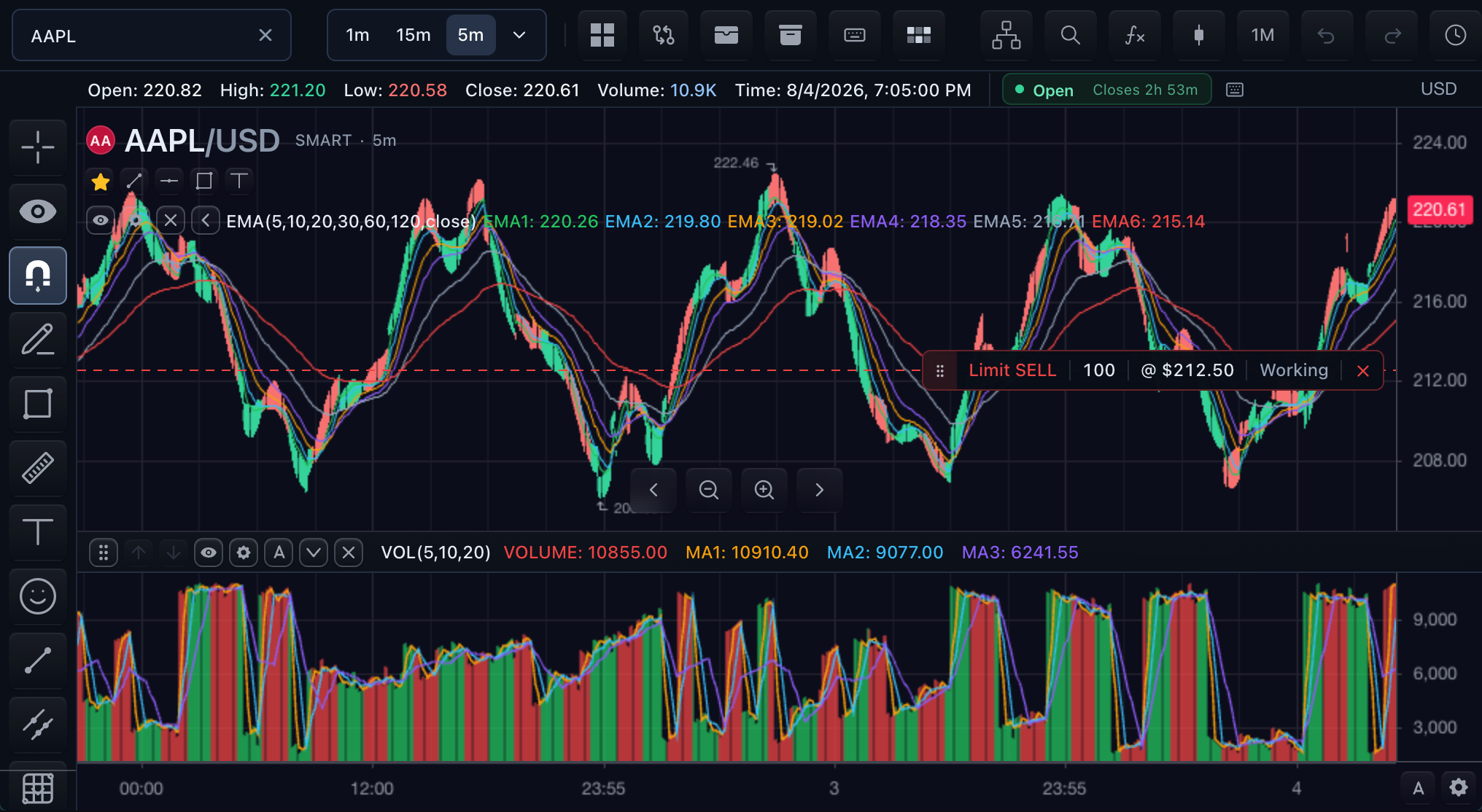
Attach a TradingBrokerAdapter to let the chart create a
TradingControllerApi, or pass a host-owned trading controller that is
already shared with other surfaces. Either path renders broker-owned orders,
positions, executions, and built-in trading actions without creating a second
trading authority.
Enable built-in chart trading
Use the object form when the product needs an explicit surface policy.
import type {
  MarketDataFeed,
  SdkSymbolInfo,
  TradeScriptSdkProducts,
  TradingBrokerAdapter,
} from '@tradescript/pro/sdk';

declare const sdk: TradeScriptSdkProducts;
declare const datafeed: MarketDataFeed;
declare const broker: TradingBrokerAdapter;
declare const symbol: SdkSymbolInfo;

const symbolLink = sdk.symbols.createLinkController({
  groupId: 'primary-trading',
  initialSymbol: symbol,
});

const mounted = sdk.chart.mount({
  mount: '#chart',
  symbol,
  interval: '1D',
  datafeed,
  broker,
  symbolLink,
  features: {
    trading: {
      enabled: true,
      accountManager: { enabled: true },
      priceAxisOrderUi: 'built-in',
    },
  },
});

const widget = await mounted.ready();
const marketData = widget.data();
const trading = widget.trading();
await trading.connect();
await trading.getState();

export async function destroyTradingChart(): Promise<void> {
  try {
    await trading.disconnect();
  } finally {
    mounted.destroy();
    symbolLink.destroy();
  }
}
Both controllers above come from the ready chart widget. Do not construct a second market-data or trading controller for an auxiliary surface.
| Option | Effect |
|---|---|
enabled | Enables or disables all chart-owned trading affordances. |
orderTicket | Enables the built-in ticket page; the object form also controls its order-info section. |
depthLadder | Enables the built-in executable ladder; the object form configures its price-window policy. It still requires depth capability from the feed. |
accountManager | Enables Account Manager availability; its object form controls the broker button, symbol logos, and native action-dialog policies. The broker button also requires supportsAccountPanel: true. |
priceAxisOrderUi | 'built-in' opens the controller-backed on-chart draft; 'events-only' emits price-axis-action for host-owned UI. |
notifications | Enables notifications or configures transient-event and persisted-history policy. |
modifyOrderContext | Enables or configures broker-native context enrichment for order modification. |
These are all top-level TradingChartFeatureOptions fields. See the
widget API reference
for their nested option contracts and defaults.
The chart draws only broker-published state. Placement acknowledgement alone does not create an order line, position line, or execution marker.
Add standalone entry surfaces
The compact launcher and executable ladder reuse the chart's connected controller. The ladder also receives the chart's market-data controller and owns one depth subscription for the exact symbol selected by the shared link.
import {
  symbolLinkIdentity,
  type MarketDataFeed,
  type SdkSymbolInfo,
  type TradeScriptSdkProducts,
  type TradingBrokerAdapter,
} from '@tradescript/pro/sdk';

declare const sdk: TradeScriptSdkProducts;
declare const datafeed: MarketDataFeed;
declare const broker: TradingBrokerAdapter;
declare const symbol: SdkSymbolInfo;

export async function mountTradingTools(): Promise<() => Promise<void>> {
  const symbolLink = sdk.symbols.createLinkController({
    groupId: 'primary-trading',
    initialSymbol: symbol,
  });
  const chartMount = sdk.chart.mount({
    mount: '#chart',
    symbol,
    interval: '1D',
    datafeed,
    broker,
    symbolLink,
    features: { trading: true },
  });

  const widget = await chartMount.ready();
  const marketData = widget.data();
  const trading = widget.trading();
  await trading.connect();
  await trading.getState();

  const [capabilities, operations] = await Promise.all([
    marketData.getCapabilities(),
    marketData.getOperationSupport(),
  ]);
  if (
    capabilities.supportsQuotes !== true ||
    capabilities.supportsDepth !== true ||
    operations.subscribeQuotes !== true ||
    operations.subscribeDepth !== true
  ) {
    try {
      await trading.disconnect();
    } finally {
      chartMount.destroy();
      symbolLink.destroy();
    }
    throw new Error('Trading tools require quote and complete-book depth subscriptions.');
  }

  const launcherMount = sdk.orderTicketLauncher.mount({
    mount: '#order-ticket-launcher',
    trading,
    symbolLink,
    symbol: symbol.ticker,
    symbolInfo: symbol,
    defaultQuantity: 10,
  });
  const ladderMount = sdk.ladder.mount({
    mount: '#depth-ladder',
    trading,
    marketData,
    symbolLink,
    symbol: symbol.ticker,
    levels: 20,
    priceWindow: 'follow-price',
  });

  let quoteGeneration = 0;
  let unsubscribeQuote: (() => void) | undefined;
  const followLinkedSymbol = (linkedSymbol: SdkSymbolInfo) => {
    unsubscribeQuote?.();
    const generation = ++quoteGeneration;
    const linkedIdentity = symbolLinkIdentity(linkedSymbol);

    // Clear the old quote before changing identity; currentQuote has no symbol field.
    launcherMount.update({
      symbol: linkedSymbol.ticker,
      symbolInfo: linkedSymbol,
      currentQuote: undefined,
    });
    ladderMount.update({ symbol: linkedSymbol.ticker });

    unsubscribeQuote = marketData.subscribeQuotes(
      [linkedSymbol],
      (quotes) => {
        if (generation !== quoteGeneration) return;
        const currentQuote = quotes.find(
          (quote) => symbolLinkIdentity(quote.symbol) === linkedIdentity,
        );
        if (currentQuote) launcherMount.update({ currentQuote });
      },
      { fastSymbols: [linkedSymbol] },
    );
  };

  followLinkedSymbol(symbolLink.getState().symbol ?? symbol);
  const unsubscribeSymbol = symbolLink.subscribe(followLinkedSymbol);

  return async () => {
    quoteGeneration += 1;
    unsubscribeSymbol();
    unsubscribeQuote?.();
    launcherMount.destroy();
    ladderMount.destroy();
    try {
      await trading.disconnect();
    } finally {
      chartMount.destroy();
      symbolLink.destroy();
    }
  };
}
sdk.orderTicketLauncher exposes Buy and Sell launch actions and can accept
host invocations through onLauncherReady. Because currentQuote has no
symbol field, the host clears it and replaces its quote subscription whenever
the full provider-owned symbol changes. The generation check rejects a late
callback from the previous symbol.
sdk.ladder calls the same broker operations as other trading surfaces. Given
marketData and symbolLink, it replaces its own depth subscription when the
linked symbol changes. Each callback from the feed must be a complete current
book, not a delta. The ladder derives its reference price from that book when
currentPrice is absent.
features.trading controls chart-owned trading chrome. It does not mount the
standalone launcher or ladder shown here.
Required authorities
| Surface | Broker requirements | Market-data requirements |
|---|---|---|
| Chart order and position UI | Current orders, positions, executions, and supported mutations | Resolved symbol and chart bars |
| Standalone ticket launcher | Placement; getTradingSymbolInfo and preview are recommended | supportsQuotes: true and subscribeQuotes, replaced for each linked SdkSymbolInfo; clear the previous quote before switching |
| Executable depth ladder | Placement; symbol rules and the enabled cancellation or position methods are recommended | supportsDepth: true and subscribeDepth for the exact linked SdkSymbolInfo; every callback replaces the complete current book |
| Account Manager | supportsAccountPanel, getAccountManagerInfo, state, and implemented row actions | None beyond exact symbols carried in broker rows |
Disable any surface whose backend or feed cannot meet its contract. Feature flags narrow availability; they never manufacture broker methods or depth data.
Teardown
Destroy auxiliary surface mounts and stop host-owned quote/link subscriptions
first. For a chart-owned adapter, then await trading.disconnect() and use
finally to destroy both the chart mount and the host-owned symbolLink, even
if disconnection rejects. The complete auxiliary example above follows that
order.
If the chart received an externally owned trading controller, child surfaces
destroy only their own mounts. The host that created the controller disconnects
and destroys it after every surface has unmounted; the owner of symbolLink
still destroys that link separately.
Verify the integration
- One published working order appears once on the chart and in Account Manager.
- One price-axis action opens built-in draft UI or emits one host event, according to policy.
- The ladder uses the selected symbol's depth and never another symbol's rows.
- Unavailable actions are hidden or disabled before they can mutate broker state.
- Teardown closes broker and depth subscriptions once.
Next steps
- Order Ticket — configure the full entry form and preview policy.
- Account Manager — declare pages, columns, and row actions.
- Trading terminal — compose these surfaces into a linked workspace.