Account Manager
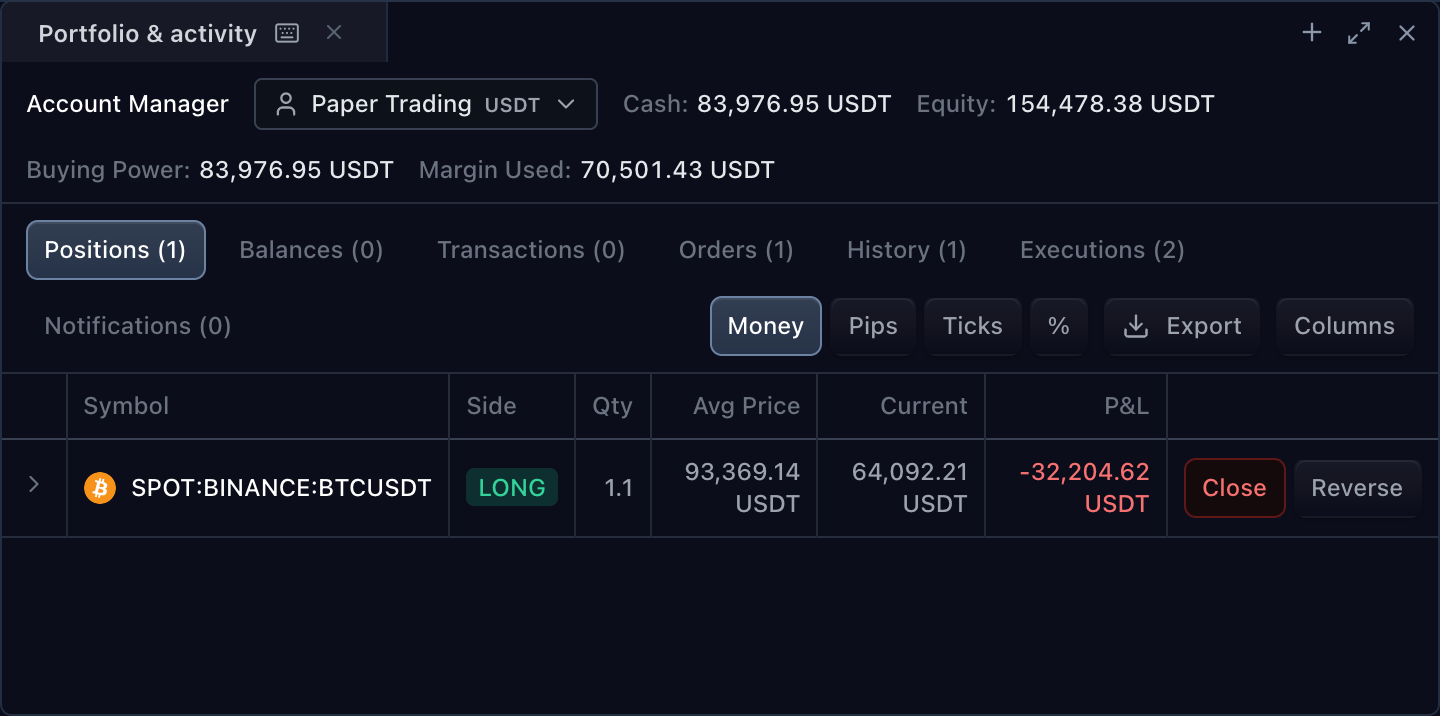
The framework-neutral accountPanel surface renders account summary and
activity from a shared TradingControllerApi. Adapter metadata declares the
pages, columns, formatters, and actions. Standard pages project broker-owned
TradingState; custom pages can load and subscribe to their own rows.
Mount the panel
Mount the framework-neutral surface from the authorized SDK products. The host owns the shared trading controller and the returned surface mount.
import type {
  TradeScriptSdkProducts,
  TradingControllerApi,
} from '@tradescript/pro/sdk';

declare const sdk: TradeScriptSdkProducts;
declare const trading: TradingControllerApi;

export function mountAccountManager(element: HTMLElement): () => void {
  const panel = sdk.accountPanel.mount({
    mount: element,
    trading,
  });

  return () => panel.destroy();
}
React hosts can use the thin adapter instead:
import type {
  TradeScriptSdkProducts,
  TradingControllerApi,
} from '@tradescript/pro/sdk';
import { TradingAccountPanel } from '@tradescript/pro/react/widgets/account-panel';

declare const sdk: TradeScriptSdkProducts;
declare const trading: TradingControllerApi;

export function AccountActivity() {
  return <TradingAccountPanel sdk={sdk} controller={trading} />;
}
Reuse the controller already connected to the chart or order ticket. Destroying the surface mount, or unmounting the React component, releases only panel-owned UI and subscriptions; it does not disconnect or destroy the controller.
Standard pages
| Page | Data source | Empty state |
|---|---|---|
| Positions | Open, non-flat rows from TradingState.positions | No open positions |
| Individual positions | Open rows from TradingState.individualPositions | No individual positions |
| Orders | TradingState.orders | No working orders |
| History | Closed TradingState.orders, ordersHistory, and getOrdersHistory | No historical orders |
| Executions | TradingState.executions | No executions |
| Balances | TradingState.cryptoBalances | No balances |
| Transactions | TradingState.cashTransactions | No transactions |
| Notifications | TradingState.messages | No notifications |
Metadata must supply a standard page or its column definition before
pageVisibility can show it. Visibility does not create a missing page. When
supportsPositionNetting is true and both position definitions exist, the
panel folds Individual positions into a Net/Individual control on the Positions
page instead of rendering a second tab.
The panel resolves getFeatures and getAccountManagerInfo for the mounted
controller. While they load, it shows an explicit loading state. Missing
metadata or supportsAccountPanel: false produces an unsupported state. Account
events update rows and summary values, but do not refetch metadata; declare the
complete page model needed across the controller's accounts.
Declare pages and actions
Use the authorization-bound helper on the SDK trading facade, then return its metadata from the adapter. This safe starting point disables mutation actions that the example adapter does not implement.
import type {
  TradeScriptSdkProducts,
  TradingBrokerAdapter,
  TradingState,
} from '@tradescript/pro/sdk';

declare const sdk: TradeScriptSdkProducts;
declare const state: TradingState;
declare const submitOrder: TradingBrokerAdapter['placeOrder'];

const accountManagerInfo = sdk.trading.createDefaultTradingAccountManagerInfo({
  supportsOrders: true,
  supportsPositions: true,
  supportsOrderHistory: true,
  supportsExecutions: true,
  supportsOrderCancellation: false,
  supportsClosePosition: false,
  supportsIndividualPositionClose: false,
  supportsIndividualPositionBrackets: false,
});

export const broker: TradingBrokerAdapter = {
  getState: async () => state,
  placeOrder: submitOrder,
  getFeatures: async () => ({ supportsAccountPanel: true }),
  getAccountManagerInfo: () => accountManagerInfo,
};
supportsOrderCancellation and supportsClosePosition default to enabled when
omitted. Individual-position Close and Brackets actions also default to enabled
when that page is included. Set those flags to false unless the corresponding
adapter mutation or host dialog flow exists. Batch Cancel and Reverse are added
only when explicitly enabled.
TradingAccountManagerInfo can declare summary fields, account-menu actions,
standard or custom pages, multiple tables, sorting, status filters, row and
table actions, visibility, and named or custom formatters. Import the
TradingAccountManager* types from @tradescript/pro/sdk instead of copying the
metadata shape.
Accounts and panel state
The account selector reads TradingState.accounts and selects
activeAccountId (falling back to an account marked isActive, then the first
account). To make another account selectable, implement setActiveAccount on
the adapter. After that method resolves, the controller publishes the new
active account to the panel.
Standard rows are filtered to the active account where their contracts carry
accountId. Every custom-table request also receives the active accountId;
switching accounts reloads its rows and replaces its subscriptions.
Panel view state has explicit host seams:
| Concern | Surface options |
|---|---|
| Initial page | defaultPageId |
| Controlled sorting | sortState, onSortStateChange |
| Controlled columns and summary fields | visibilityState, onVisibilityStateChange |
| Local visibility persistence | persistStateKey |
| CSV export | onExport (otherwise the panel downloads the file) |
| Semantic panel control | accountPanelController, onReady |
Custom tables
Declare source: 'custom' and omit inline rows when the adapter owns the
data. Paginated and incremental rows require a stable id; stable ids are also
recommended for snapshot rows.
import type {
  TradingAccountManagerColumn,
  TradingAccountManagerIdentifiedRow,
  TradingAccountManagerInfo,
  TradingAccountManagerTable,
  TradingAccountManagerTableUpdate,
  TradingBrokerAdapter,
  TradingState,
} from '@tradescript/pro/sdk';

declare const state: TradingState;
declare const submitOrder: TradingBrokerAdapter['placeOrder'];

const columns: TradingAccountManagerColumn[] = [
  { id: 'time', label: 'Time', dataFields: ['time'], formatter: 'datetime' },
  { id: 'event', label: 'Event', dataFields: ['event'] },
];

const table: TradingAccountManagerTable = {
  id: 'activity',
  title: 'Activity',
  source: 'custom',
  updateMode: 'incremental',
  initialSorting: { columnId: 'time', direction: 'desc' },
  columns,
};

const info: TradingAccountManagerInfo = {
  pages: [{ id: 'activity', title: 'Activity', tables: [table] }],
};

const rows: TradingAccountManagerIdentifiedRow[] = [
  { id: 'connected', time: Date.now(), event: 'Connected' },
];
const listeners = new Set<(update: TradingAccountManagerTableUpdate) => void>();

export const broker: TradingBrokerAdapter = {
  getState: async () => state,
  placeOrder: submitOrder,
  getFeatures: async () => ({ supportsAccountPanel: true }),
  getAccountManagerInfo: () => info,
  getAccountManagerTableRows: async () => rows,
  subscribeAccountManagerTableUpdates(_request, callback) {
    listeners.add(callback);
    return () => { listeners.delete(callback); };
  },
};
The table's declared mode selects its live contract:
| Mode | Initial read | Live updates |
|---|---|---|
| Snapshot (default) | getAccountManagerTableRows | subscribeAccountManagerTableRows replaces the complete row list |
| Incremental | getAccountManagerTableRows | subscribeAccountManagerTableUpdates sends explicit replace, upsert, or delete operations |
| Paginated | getAccountManagerTablePage | The subscription selected by updateMode, when supplied |
Both subscription methods return Unsubscribe. The panel calls it on unmount
and before replacing a table subscription after an account or definition
change. It never infers update semantics from payload shape.
Cursor pagination
Declare pagination on a custom table, place that table in metadata, and expose
getAccountManagerTablePage on the same adapter.
import type {
  TradingAccountManagerColumn,
  TradingAccountManagerIdentifiedRow,
  TradingAccountManagerInfo,
  TradingAccountManagerTable,
  TradingAccountManagerTableCursor,
  TradingAccountManagerTablePage,
  TradingAccountManagerTablePageRequest,
  TradingBrokerAdapter,
  TradingState,
} from '@tradescript/pro/sdk';

declare const state: TradingState;
declare const submitOrder: TradingBrokerAdapter['placeOrder'];
declare function loadLedger(request: {
  accountId?: string;
  cursor?: TradingAccountManagerTableCursor;
  limit?: number;
}): Promise<{
  rows: TradingAccountManagerIdentifiedRow[];
  nextCursor?: TradingAccountManagerTableCursor;
}>;

const columns: TradingAccountManagerColumn[] = [
  { id: 'time', label: 'Time', dataFields: ['time'], formatter: 'datetime' },
  { id: 'event', label: 'Event', dataFields: ['event'] },
];

const ledgerTable: TradingAccountManagerTable = {
  id: 'ledger',
  title: 'Ledger',
  source: 'custom',
  columns,
  pagination: { pageSize: 50, loadMoreLabel: 'Load more' },
};

const info: TradingAccountManagerInfo = {
  pages: [{ id: 'ledger', title: 'Ledger', tables: [ledgerTable] }],
};

async function getAccountManagerTablePage(
  request: TradingAccountManagerTablePageRequest,
): Promise<TradingAccountManagerTablePage> {
  const result = await loadLedger({
    accountId: request.accountId,
    cursor: request.cursor,
    limit: request.limit,
  });

  return result.nextCursor !== undefined
    ? { rows: result.rows, nextCursor: result.nextCursor, hasMore: true }
    : { rows: result.rows, hasMore: false };
}

export const broker: TradingBrokerAdapter = {
  getState: async () => state,
  placeOrder: submitOrder,
  getFeatures: async () => ({ supportsAccountPanel: true }),
  getAccountManagerInfo: () => info,
  getAccountManagerTablePage,
};
hasMore: true requires nextCursor. The controller returns the cursor
unchanged on the next request; 0 and the empty string are valid cursors. The
panel merges pages by stable row id so repeated ids update rather than duplicate
rows.
Action routing and formatting
Action kind determines ownership:
| Action kind | Owner |
|---|---|
cancel-order, cancel-orders, net close-position | Matching trading-controller mutation |
reverse-position | reversePosition, or the custom-action lane when supplied |
Individual close-position | closeIndividualPosition, or the custom-action lane when supplied |
modify-order, close-partial-position, edit-position-brackets, or requiresDialog: true | Host onTerminalActionRequest; the panel does not mutate |
select-symbol | Host onSymbolSelect |
focus-execution | Panel/chart focus; supply chart and optionally focus callbacks |
custom | executeAccountManagerAction(actionId, { source, row }) |
Do not declare an action without its owner. Custom account actions receive the
active account as row; custom row actions receive that row; custom table
actions receive the table's current rows.
Prefer built-in formatter names for money, price, quantity, dates, status,
side, and P&L. Price formatters use row metadata first, then exact symbol and
account rules from TradingState.symbolInfos. Custom formatters provide text
for export and may return an element for display.
Verify the integration
- One emitted standard collection appears on the matching page.
- Replacing that collection with an empty list shows the declared empty state.
- Account selection changes the active account and reloads custom rows once.
- Each visible action reaches its documented controller or host owner.
- Unmounting and account switching release every table subscription.
- Pagination forwards each cursor once without duplicating stable row ids.
Next steps
- State and events — publish standard page collections.
- Orders — define working and historical order records.
- Trading terminal — mount Account Manager in a linked workspace.
- Trading API reference — inspect the complete generated contracts.