Trading quickstart
TradingBrokerAdapter is the boundary between TradeScript Pro Charts and one
broker or order-management session. Your application implements the adapter.
The SDK wraps it in a TradingControllerApi that the chart and standalone
trading widgets can share.
getState and placeOrder are the only required adapter methods. That is a
complete controller contract, not a promise that every trading surface is
available. Add the specific rules, previews, market data, and mutations required
by the surfaces you choose later.
The connection below can power all three examples. The standard ticket works
once state declares order types and durations. Option and prediction-market
tickets additionally need their asset-specific market data and previewOrder.
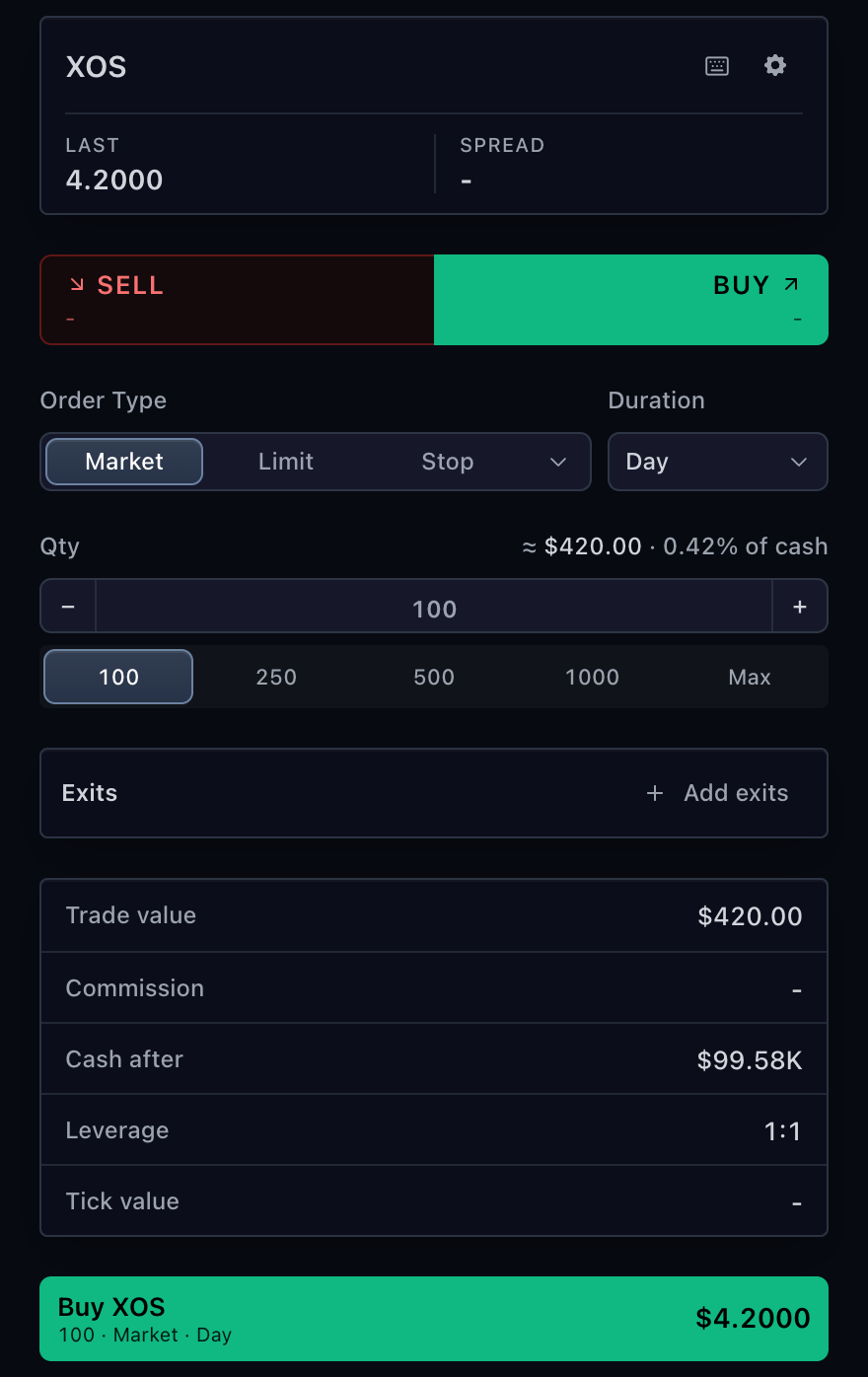
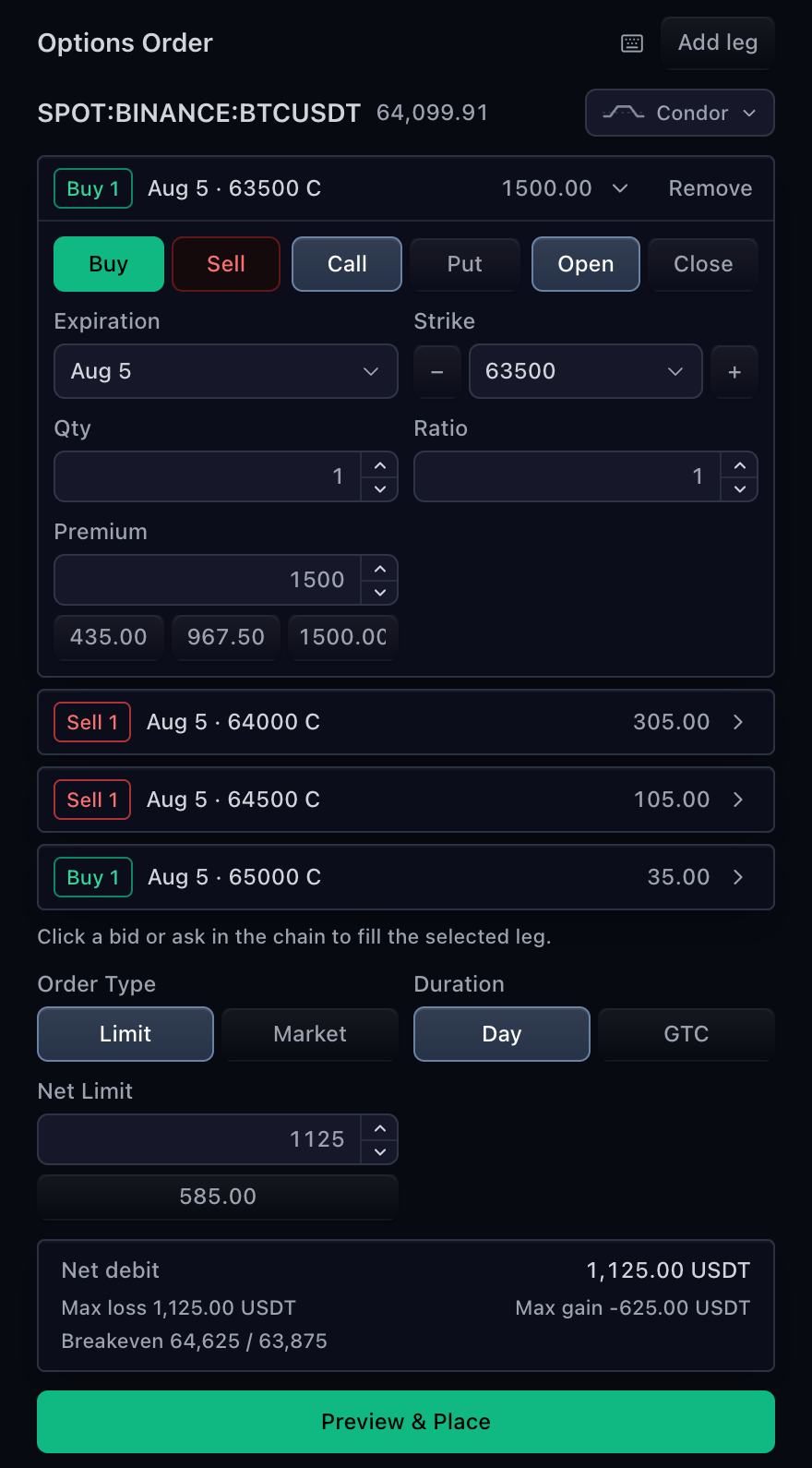
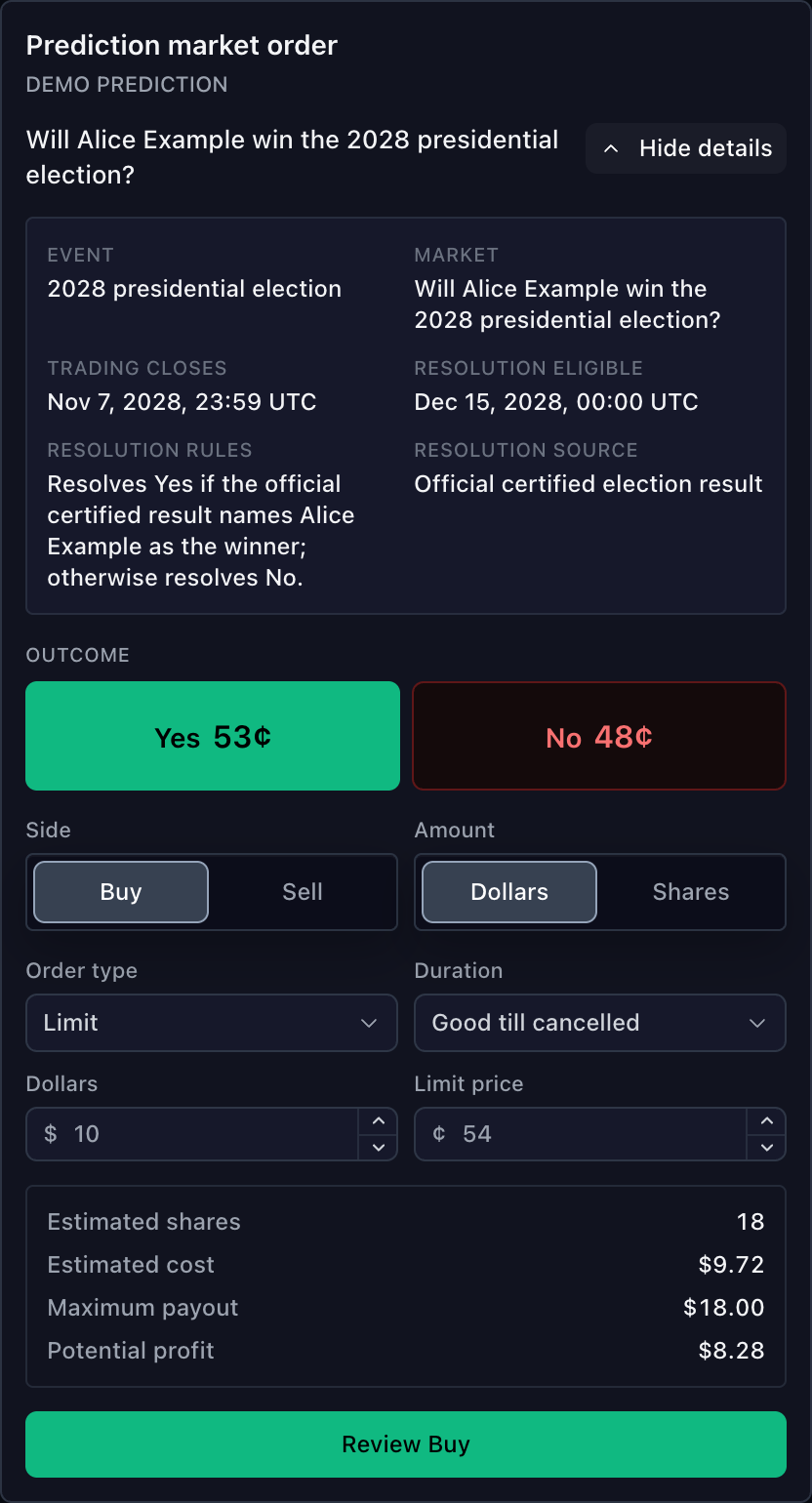
Standard order ticket · Option order ticket · Prediction-market order ticket
Have a deployment lease and a working MarketDataFeed ready.
Step 2 mounts the chart into a #chart element with a real height. See the
general chart Quickstart for installation and
SDK setup.
How trading talks to your backend
Your backend owns financial truth. The SDK transports typed intents, maintains the current controller snapshot, and renders that snapshot.
An accepted placement response acknowledges the request. It does not create a chart line or table row. Publish the resulting order through adapter state or events when the backend reports it.
1. Implement the minimum adapter
This example calls two authenticated backend endpoints. Replace the declared parsers with your runtime schema validation; TypeScript types alone do not validate network responses.
import type {
  TradingBrokerAdapter,
  TradingPlaceOrderResult,
  TradingState,
} from '@tradescript/pro/sdk';

declare function parseTradingState(value: unknown): TradingState;
declare function parsePlaceOrderResult(value: unknown): TradingPlaceOrderResult;

export const broker = {
  executionEnvironment: 'paper',

  async getState() {
    const response = await fetch('/api/trading/state', {
      credentials: 'include',
    });
    if (!response.ok) {
      throw new Error(`Trading state request failed: ${response.status}`);
    }
    return parseTradingState(await response.json());
  },

  async placeOrder(draft, context, options) {
    const response = await fetch('/api/trading/orders', {
      method: 'POST',
      credentials: 'include',
      headers: { 'content-type': 'application/json' },
      body: JSON.stringify({ draft, context, mutation: options }),
    });

    // A transport failure does not prove rejection. The request may have
    // reached the broker, so reconcile authoritative state before retrying.
    if (!response.ok) {
      throw new Error('Order outcome is unknown; reconcile before retrying.');
    }
    return parsePlaceOrderResult(await response.json());
  },
} satisfies TradingBrokerAdapter;
getState() returns one complete snapshot. Required collections may be empty,
but they must be present. This smallest useful response also declares enough
account-level choices for the standard order ticket:
{
  "connectionStatus": "connected",
  "activeAccountId": "paper-primary",
  "features": {
    "supportsOrders": true,
    "supportsPositions": true
  },
  "accounts": [
    {
      "id": "paper-primary",
      "name": "Paper account",
      "currency": "USD",
      "isActive": true,
      "capabilities": {
        "supportsTrading": true,
        "supportedOrderTypes": ["market", "limit"],
        "supportedDurations": [
          { "type": "day", "label": "Day" },
          { "type": "gtc", "label": "GTC" }
        ]
      }
    }
  ],
  "orders": [],
  "positions": [],
  "executions": []
}
Keep credentials, final validation, idempotency, and risk checks on the backend.
Use executionEnvironment: 'live' only when this adapter truly reaches a live
financial account.
Verify before continuing:
getState()returns the authenticated account and every required collection.- A confirmed business rejection resolves as
{ accepted: false, ... }. - A timeout, network loss, or uncertain server response rejects the request and is reconciled before any retry.
2. Attach the adapter to a chart
Passing broker creates a controller owned by this chart runtime. The example
mounts the chart and enables its built-in trading affordances; it does not mount
either standalone ticket pictured above.
import {
  createTradeScriptSdk,
  type MarketDataFeed,
  type SdkSymbolInfo,
} from '@tradescript/pro/sdk/core';
import type { TradingBrokerAdapter } from '@tradescript/pro/sdk';

declare const broker: TradingBrokerAdapter; // The adapter from step 1.
declare const datafeed: MarketDataFeed;
declare const deploymentLease: string;

export const symbol: SdkSymbolInfo = {
  ticker: 'AAPL',
  exchange: 'NASDAQ',
  type: 'stock',
};

export const sdk = await createTradeScriptSdk({ lease: deploymentLease });
export const mounted = sdk.chart.mount({
  mount: '#chart',
  symbol,
  interval: '1D',
  datafeed,
  broker,
  features: { trading: true },
});

export const widget = await mounted.ready();
export const trading = widget.trading();

await trading.connect();
export const initialTradingState = await trading.getState();

export async function destroyTradingChart() {
  try {
    await trading.disconnect();
  } finally {
    mounted.destroy();
  }
}
connect() hands a TradingHost to adapters that implement connect; it does
not load state. Call getState() explicitly after every initial connection or
reconnect. When another composition supplies an existing trading controller,
that host retains disconnect and destruction responsibility.
Verify before continuing:
initialTradingStatematches the backend snapshot exactly.- The chart reaches
ready()and exposes the same controller throughwidget.trading(). - Route teardown awaits disconnect and still destroys the mount if disconnect fails.
3. Render the standard order ticket
Pass the controller and exact symbol from step 2 into the React ticket. Supply a current price from market data; broker state is not a second quote feed.
import type {
  SdkSymbolInfo,
  TradeScriptSdkProducts,
  TradingControllerApi,
} from '@tradescript/pro/sdk';
import {
  TradingOrderTicket,
} from '@tradescript/pro/react/widgets/order-ticket';

interface OrderEntryProps {
  sdk: TradeScriptSdkProducts;
  trading: TradingControllerApi;
  symbol: SdkSymbolInfo;
  currentPrice: number;
}

export function OrderEntry({
  sdk,
  trading,
  symbol,
  currentPrice,
}: OrderEntryProps) {
  return (
    <TradingOrderTicket
      sdk={sdk}
      controller={trading}
      symbol={symbol}
      currentPrice={currentPrice}
      defaultQuantity={1}
    />
  );
}
Submitting this ticket calls the adapter's placeOrder. An acknowledgement may
update ticket feedback, but only the next authoritative event or
await trading.getState() may add the order to controller state.
Verify before continuing:
- One submit produces one backend order request with the exact symbol, account, draft, context, and supplied mutation metadata.
- A confirmed rejection stays rejected and never appears as a working order.
- An accepted acknowledgement creates no row or chart line until the backend reports the order.
4. Add only what your product needs
Adapter capabilities
trading.getOperationSupport() is the synchronous authority for callable
controller operations. It includes controller-owned operations and documented
fallbacks, not just a one-to-one reflection of adapter methods. Entitlements and
risk wiring may narrow the returned map.
Read await trading.getFeatures() separately for asynchronous broker/account
facts that may narrow what the UI should offer in the current session. Those
features never widen structural operation support.
| Product capability | Adapter methods to add | Guide |
|---|---|---|
| Backend-pushed state | Choose subscribe, or connect(host) with host.emit / host.setState | State and events |
| New-order preview | previewOrder | Orders |
| Working-order modification | previewModifyOrder, modifyOrder as supported | Orders |
| Cancellation | cancelOrder; optionally cancelOrders or atomic cancelAllOrders | Orders |
| Position actions | Add only the preview, modify, close, reverse, or flatten methods you support | Positions |
| Account switching | setActiveAccount; listAccounts otherwise falls back to fresh state | Accounts, capabilities, and symbol rules |
| Symbol tradability and rules | getTradingSymbolInfo, or isTradable for the controller fallback | Accounts, capabilities, and symbol rules |
| Custom Account Manager content | getAccountManagerInfo and the table methods your pages use | Account Manager |
| Broker option routing | resolveOptionContract when venue-native contract identity is required | Option order ticket |
The presence of controller connect or subscribe does not prove that the
adapter has a live-update transport; those controller operations are always
available. Treat adapter transport configuration as an integration fact.
Surfaces and prerequisites
| User need | Surface | Beyond the two-method minimum |
|---|---|---|
| Stock, fund, forex, futures, or crypto entry | TradingOrderTicket | Order types and durations in state, or broker symbol rules |
| Broker-defined ticket fields | TradingOrderTicket with options={{ fieldLayout }} | A typed field layout from the host or broker settings |
| Single-leg or multi-leg options | OptionOrderTicket | Option contracts and quotes from market data, plus previewOrder |
| Exact prediction-outcome entry | PredictionMarketOrderTicket | Exact outcome symbols and quotes, plus previewOrder |
| Orders and actions on a chart | Built-in chart trading | features.trading and the relevant adapter capabilities |
| Orders, positions, fills, and custom account pages | TradingAccountPanel | Base state plus getAccountManagerInfo metadata declaring every standard or custom page |
| Complete linked workspace | BrokerTradingTerminal | Market data; add one broker adapter or trading controller for order and account surfaces |
Within one broker session, pass the same controller to the chart and standalone
widgets. In a multi-chart mount, per-chart broker values create per-chart
controllers. Inject one widget-level trading controller only when the charts
should intentionally share that authority.
Live chart and order-entry prices remain a separate authority. Historical bars,
quotes, depth, tape, sessions, option series, and prediction-outcome quotes come
from MarketDataFeed. Broker-owned position valuation fields such as
marketPrice and P&L do not turn trading state into a second market-data feed.
Production concerns
Identity
Carry exact SdkSymbolInfo, account, order, position, execution, and contract
identities through every request and update. Display tickers and labels are not
execution keys.
State ordering
Load a fresh snapshot at connect or reconnect, then resume events after that
snapshot boundary. TradingEvent has no global revision, so the adapter must
buffer, serialize, or watermark a racing backend stream.
Financial mutations
Authenticate and revalidate every mutation on the backend. Preserve supplied operation metadata, add a backend correlation id, and reconcile authoritative state before retrying an uncertain request.
Next steps
- Broker integration — add authenticated mutations, ordered live updates, reconnect reconciliation, and production verification.
- State and events — publish coherent snapshots across fills and reconnects.
- Order Ticket — configure the standard entry form beyond the minimum example.
- Trading surfaces — choose chart trading, Account Manager, or a complete terminal without creating another authority.
- Chart trading — configure on-chart actions and auxiliary entry surfaces.
- Account Manager — configure account pages, tables, and row actions.
- Trading terminal — compose chart, market data, trading, and account surfaces.