Accessibility
TradeScript Pro Charts renders into the host page instead of an iframe, so accessibility behavior uses the browser's normal DOM and focus model.
The SDK targets WCAG 2.2 Level AA. What follows is implemented behavior and known gaps, not a claim of complete conformance or independent certification. Every claim below is observable in the running product and maps to a numbered check on the validation checklist.
Responsibility map
| Area | SDK responsibility | Host responsibility |
|---|---|---|
| Chart name/description | Expose current chart identity and state | Provide meaningful product context |
| Keyboard controls | Operable toolbars, menus, dialogs, tables, and drawing workflow | Avoid intercepting documented shortcuts |
| Focus | Visible focus and restoration within SDK UI | Logical entry/exit order around the widget |
| Contrast/motion | Theme tokens and reduced-motion behavior | Select and validate the deployed theme |
| Errors | Structured, perceivable SDK states | Supply actionable host copy and recovery |
Keyboard
- The chart canvas container is keyboard-focusable in natural tab order.
- When the chart itself has focus, Left/Right moves the crosshair one bar, Home/End moves to the visible boundary, PageUp/PageDown moves ten bars, and Up/Down changes the inspected price by one symbol tick. Verify with checklist item 3.
- Top-chart and drawing toolbars expose toolbar semantics. When
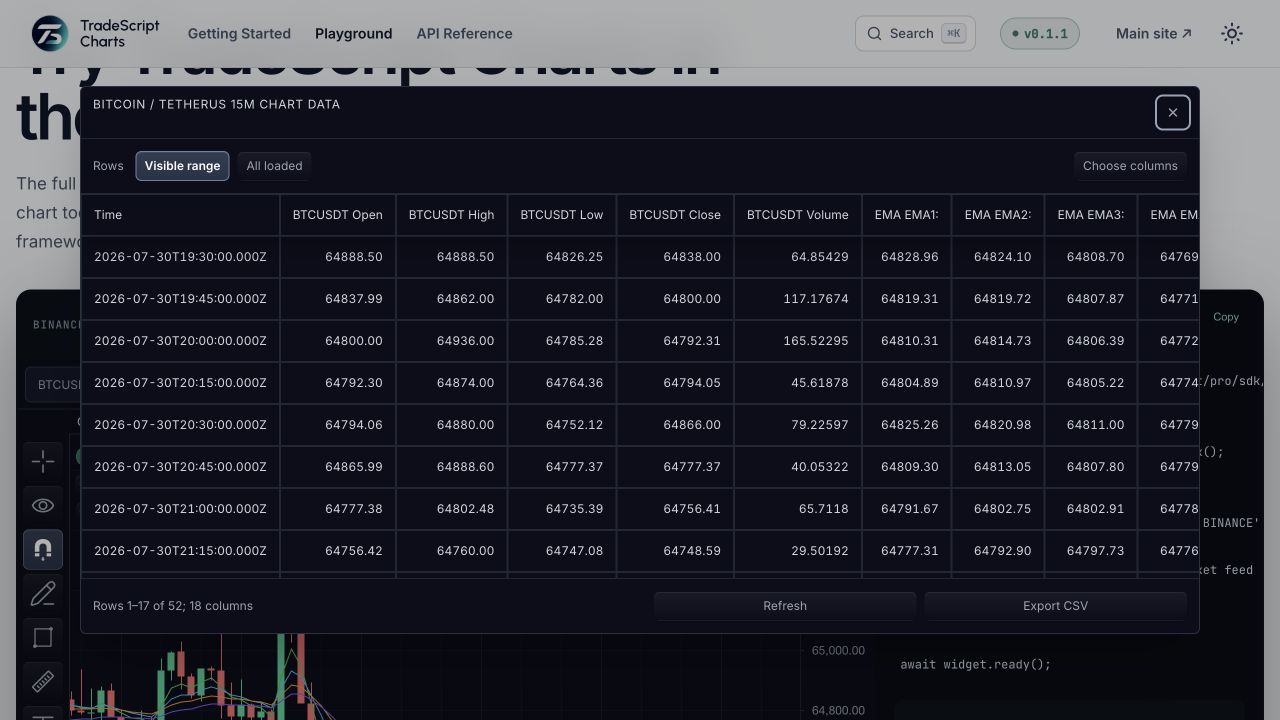
accessibility.keyboardNavigationis enabled, Alt+Z enters the first toolbar, arrow keys move through enabled controls, and Home/End move to the first/last enabled control. Verify with checklist item 2. - Alt+D opens the unified virtualized data grid. It includes exact OHLCV, comparisons, and every exported indicator plot; users can switch between visible and all-loaded rows, select columns, export CSV, and navigate cells with Arrow keys, Home/End, and Page Up/Page Down. Enter moves the visual crosshair to that row. Verify with checklist item 4.
- Alt+Shift+D opens the keyboard drawing creator. Users choose any SDK drawing tool and one or more exact visible-bar/price points without pointer input. Verify with checklist item 5.
- Alt+O and Shift+Alt+O cycle visible drawings. Arrow keys move a selected drawing one pixel, Shift+Arrow moves ten pixels, Alt+Arrow clones, Delete removes, and Escape clears selection. Verify with checklist item 6.
- Multi-chart workspaces support Tab/Shift+Tab and Shift+ArrowRight/Shift+ArrowLeft chart switching with DOM focus transferred to the active chart. Verify with checklist item 7.
- The default chart context menu, shared tabs, and shared select controls support arrow-key navigation, Home/End, Enter/Space activation, and Escape where applicable. Verify with checklist item 8.
Screen reader
- The chart container exposes
role="img"and a dynamic label with the active symbol and interval. Verify with checklist item 1. - The chart container links a generated
aria-describedbysummary with chart identity plus latest-bar OHLC/volume and visible-range high/low values unlessaccessibility.detailedChartDescriptionsisfalse. Verify with checklist item 1. - Crosshair updates publish a hidden polite live-region message with the active symbol, interval, price, time, or bar index unless
accessibility.crosshairAnnouncementsisfalse. Keyboard crosshair moves announce time plus exact OHLCV values. Verify with checklist item 3. - Every keyboard drawing operation — move, clone, delete, selection change — is announced through a polite live region. Verify with checklist item 6.
- Shared SDK dialogs use
role="dialog",aria-modal, and labelled titles; the data grid uses semantic table headers. The default context menu, tabs, and selects expose the corresponding ARIA roles. Verify with checklist items 4 and 8.
Focus
- Shared SDK dialogs take initial focus, trap focus while open, close on Escape, and restore focus to the trigger. Verify with checklist item 8.
- Built-in focus indicators remain visible across SDK chrome and the chart canvas. Verify with checklist items 2 and 9.
- Multi-chart switching transfers DOM focus to the newly active chart, so the focus position always matches the announced chart. Verify with checklist item 7.
Contrast
- Built-in light and dark UI tokens pass the SDK's executable WCAG contrast gate at 4.5:1 for text and 3:1 for non-text chrome.
auditChartThemeContrast()exposes the same gate for customer themes — run it in CI whenever theme tokens change. - The theme responds to
prefers-contrast: more(see High contrast tokens) and Windows forced-colors mode. Verify with checklist item 9.
import { auditChartThemeContrast } from '@tradescript/pro/sdk';

const audit = auditChartThemeContrast(customerTheme);
if (!audit.passed) {
  throw new Error(audit.issues.map((issue) => `${issue.id}: ${issue.ratio.toFixed(2)}:1`).join('\n'));
}
Motion
- The theme responds to
prefers-reduced-motion; animated extras such as shader backgrounds pause when reduced motion is requested. No essential information is conveyed by motion alone. Verify with checklist item 9.
Host responsibilities
Use features.shortcuts: false or chart.customization().setShortcuts({ enabled: false }) when the host application owns global keyboard handling. Prefer SDK actions and setShortcuts({ bindings }) for remapping so shortcuts stay editable-target gated.
Set accessibility.keyboardNavigation: false when the host owns toolbar entry and composite-widget navigation. It defaults to true.
accessibility.keyboardCrosshair, accessibility.keyboardDrawings, and accessibility.dataTable independently control the chart exploration, drawing, and semantic-table surfaces. Each defaults to true.
Use accessibility.crosshairAnnouncements: false only when the host provides an equivalent crosshair announcement surface.
Use accessibility.detailedChartDescriptions: false only when the host provides an equivalent detailed chart summary.
When embedding in a strict enterprise shell, keep host focus outlines visible and avoid CSS resets that remove button focus indicators inside the chart mount.
sdk.chart.mount({
  mount: '#chart',
  symbol: 'AAPL',
  interval: '1D',
  datafeed,
  accessibility: {
    keyboardNavigation: true,
    keyboardCrosshair: true,
    keyboardDrawings: true,
    dataTable: true,
    crosshairAnnouncements: true,
    detailedChartDescriptions: true,
    chartDescription: ({ symbol, interval }) =>
      `${symbol.name ?? symbol.ticker}, ${interval} financial chart`,
  },
});
Known gaps
- Independent WCAG 2.2 AA certification and release-by-release testing with real VoiceOver, NVDA, JAWS, and Narrator installations remain external validation activities. See Accessibility validation.
- Custom UI supplied by host callbacks, including a custom context-menu renderer, remains the host application's accessibility responsibility.
Related pages
- Accessibility Validation — the executable release checklist behind every claim on this page.
- Chart Data Table — the semantic grid alternative to reading the canvas.
- Widget Hotkeys — collision-safe keyboard actions across surfaces.
- Themes — the contrast requirements a custom palette must meet.