Mixed-Asset Catalogs
One datafeed can serve crypto, forex, equities, and prediction contracts together. The chart cannot guess what instruments mean: two venues can list the same ticker, one event can contain several tradable outcomes, and one instrument can have more than one price stream. Your backend returns those distinctions as typed facts with each instrument.
The full implementation is below. The sections after it take those fields one at a time: what each field is for, and what goes wrong without it. Basics like loadBars itself are covered in Datafeeds.
What to set
Four fields on top of a normal feed. Everything else — loadBars, realtime, the mount — is unchanged.
| Field | Set it to | Or else |
|---|---|---|
selectionId | Any stable unique id per listing, on every search row | Two listings sharing a ticker load whichever comes first. |
canonicalSymbol | Your instrument id, on the resolved symbol | Same-ticker instruments mix caches, event markers, and links. |
sessionSchedule | The instrument's trading hours, as JSON on the instrument record | No session shading, no closed badge, no weekend gaps, no hours toggle. |
marketDataSeriesId | An id per data version — only when one instrument has several | The chart refuses converted or bid/mark loads with a validation error. |
"Several data versions" means one instrument, different numbers — give each version its own id and each keeps its own cache, alerts, and drawings:
| The user is viewing | canonicalSymbol | marketDataSeriesId |
|---|---|---|
| AAPL in USD | nasdaq:aapl | nasdaq:aapl:usd |
| AAPL converted to EUR | nasdaq:aapl | nasdaq:aapl:eur |
| EURUSD bid stream | lp:eurusd | lp:eurusd:bid |
| EURUSD mark stream | lp:eurusd | lp:eurusd:mark |
Reference implementation
Everything the integration needs, in one module: search, resolution, history, live updates, the wrappers, and the mount. The highlighted lines are the four mixed-asset additions — every other line is a standard feed. Instrument data comes from your reference service and market data from your gateway; nothing about any instrument is written into the file. The example is typechecked against the SDK on every documentation build.
import {
  createChart,
  createCachingDatafeed,
  createSessionFilterDatafeed,
  withSymbolSessionSchedules,
} from '@tradescript/pro/sdk';
import type {
  AssetType,
  Bar,
  MarketDataFeed,
  SdkSymbolInfo,
  SessionScheduleSpec,
} from '@tradescript/pro/sdk';

// -- Your backend -----------------------------------------------------------
// Symbol search and resolution are answered by your reference-data service;
// candles and streams by your market-data gateway, which routes to the right
// vendor (crypto exchange, FX liquidity provider, equities vendor) server-side.
// Every instrument fact — identity, precision, tick, trading hours — is data
// from that service. Nothing about any instrument lives in this file.

const API = 'https://api.yourco.example';

/** The record your instrument service returns. Tickers may collide across venues. */
interface InstrumentRecord {
  id: string;                     // stable instrument id
  ticker: string;                 // display ticker; two venues may share it
  name: string;
  venue: string;
  type: AssetType;                // classification, for display and filters
  decimals: number;
  tick: number;
  schedule: SessionScheduleSpec;  // declared trading hours — plain JSON data
}

async function fetchInstrument(idOrTicker: string): Promise<InstrumentRecord> {
  const response = await fetch(`${API}/instruments/${encodeURIComponent(idOrTicker)}`);
  if (!response.ok) throw new Error(`Instrument lookup failed: ${response.status}`);
  return response.json();
}

function toBar(raw: { t: number; o: number; h: number; l: number; c: number; v: number }): Bar {
  return { time: raw.t, open: raw.o, high: raw.h, low: raw.l, close: raw.c, volume: raw.v };
}

// -- The feed ---------------------------------------------------------------

const myFeed: MarketDataFeed = {
  onReady() {
    return {
      supportsSearch: true,
      supportsRealTime: true,
      supportsSessionInfo: true,      // served by withSymbolSessionSchedules below
      supportsSessionCalendar: true,
    };
  },

  async searchSymbols(request) {
    const response = await fetch(`${API}/instruments?q=${encodeURIComponent(request.searchText)}`);
    if (!response.ok) throw new Error(`Instrument search failed: ${response.status}`);
    const rows: InstrumentRecord[] = await response.json();
    return rows.map((row) => ({
      symbol: {
        ticker: row.ticker,
        selectionId: row.id,           // keeps same-ticker listings distinct
        name: row.name,
        exchange: row.venue,
        type: row.type,
      },
    }));
  },

  async resolveSymbol(selection) {
    // The chart passes either a plain ticker string (hosts mounting by
    // ticker) or the symbol object a picked search row carried.
    let lookup: string;
    if (typeof selection === 'string') {
      lookup = selection;
    } else {
      lookup = selection.selectionId ?? selection.ticker;   // the exact row wins
    }
    const record = await fetchInstrument(lookup);
    // A one-to-one mapping from your record to the resolved symbol: identity,
    // display, formatting, and hours all come from your data.
    return {
      ticker: record.ticker,
      selectionId: record.id,
      canonicalSymbol: record.id,      // one stable id per instrument
      name: record.name,
      exchange: record.venue,
      type: record.type,
      pricePrecision: record.decimals,
      tickSize: record.tick,
      sessionSchedule: record.schedule,
    };
  },

  async loadBars(symbol, interval, request) {
    // The resolved symbol carries the instrument id; no second lookup needed.
    const query = new URLSearchParams({
      instrument: symbol.canonicalSymbol ?? symbol.ticker,
      interval,
      from: String(request.startTime),
      to: String(request.endTime),
      count: String(request.barCount),
    });
    const response = await fetch(`${API}/candles?${query}`);
    if (!response.ok) throw new Error(`Candles request failed: ${response.status}`);
    const rows: Array<{ t: number; o: number; h: number; l: number; c: number; v: number }> = await response.json();
    return { bars: rows.map(toBar) };
  },

  subscribeRealTimeBars(subscription, push) {
    const instrument = subscription.symbol.canonicalSymbol ?? subscription.symbol.ticker;
    const socket = new WebSocket(
      `${API.replace('https', 'wss')}/stream?instrument=${encodeURIComponent(instrument)}&interval=${subscription.interval}`,
    );
    socket.onmessage = (message) => {
      push(toBar(JSON.parse(message.data as string)));
    };
    return () => socket.close();
  },
};

// -- Wrappers and mount -----------------------------------------------------

const datafeed = createSessionFilterDatafeed(     // users get the extended-hours toggle
  createCachingDatafeed(
    withSymbolSessionSchedules(myFeed),           // per-symbol calendars, badge, shading
    { policy: 'persistent' },                     // IndexedDB cache, keyed per exact series
  ),
);

// The initial symbol is your application's routing decision (deep link, saved
// workspace, default watchlist row) — it is only the first chart. From here
// the built-in symbol search drives switching: `supportsSearch` plus
// `searchSymbols` above wire the picker, and selecting any row resolves that
// exact row and switches the chart, sessions and badge following.
const params = new URLSearchParams(window.location.search);
let initialInstrument = params.get('instrument');
if (initialInstrument === null) {
  // No deep link: ask your service for its configured default instrument.
  const fallback = await fetchInstrument('default');
  initialInstrument = fallback.id;
}

const chart = createChart('#chart', {
  symbol: initialInstrument,
  interval: '15m',
  datafeed,
});

// Programmatic switching uses the same selections search returns. Wire this to
// your application's events — a watchlist row, an order ticket, a route change:
export function showInstrument(selection: string | SdkSymbolInfo): Promise<void> {
  return Promise.resolve(chart.setSymbol(selection));
}
Verify before continuing:
- Search a ticker listed on two venues: both rows appear, and picking the second loads its own data.
- A 24x7 instrument:
24hbadge, candles through the weekend. - An equity: pre-market/regular/after-hours shading, and the extended-hours toggle hides and restores the outer candles.
- An FX pair: the weekend gap is there.
- Reload the page: bars paint instantly from cache.
Prediction contracts
Return one search row and resolved SdkSymbolInfo for each tradable outcome.
Set type: 'prediction-contract', keep selectionId and canonicalSymbol
stable for that outcome, and carry its PredictionContractInstrumentDetails
on instrument. Event grouping may organize rows in the picker, but it never
replaces the exact outcome identity.
Use the contract's priceConvention for every price boundary. A probability
series uses 0..1; a cents series uses cash cents. Bars, quotes, depth,
currentPrice, limit orders, and broker previews must agree. The SDK does not
inspect a ticker or customFields to decide which outcome or unit a number
represents.
The Prediction-market order ticket documents the complete symbol shape, preview-confirmation flow, and settlement boundary.
Backend contract
The reference implementation calls four endpoints. Each is shown below as a full reference exchange — the request the frontend sends and the complete response your backend returns. Field names are the ones the frontend maps, so if your service uses different ones, adjust the mapping code, not your API.
Search
GET /instruments?q=BTC
[
  {
    "id": "binance:btcusd",
    "ticker": "BTCUSD",
    "name": "Bitcoin / USD",
    "venue": "BINANCE",
    "type": "crypto",
    "decimals": 2,
    "tick": 0.01,
    "schedule": {
      "timezone": "Etc/UTC",
      "week": [
        { "days": [0, 1, 2, 3, 4, 5, 6], "windows": [{ "open": "00:00", "close": "24:00" }] }
      ]
    }
  },
  {
    "id": "coinbase:btcusd",
    "ticker": "BTCUSD",
    "name": "Bitcoin / USD",
    "venue": "COINBASE",
    "type": "crypto",
    "decimals": 2,
    "tick": 0.01,
    "schedule": {
      "timezone": "Etc/UTC",
      "week": [
        { "days": [0, 1, 2, 3, 4, 5, 6], "windows": [{ "open": "00:00", "close": "24:00" }] }
      ]
    }
  }
]
Both records carry the same ticker and different ids — that is the collision the picker shows as two rows and selectionId preserves through resolution. Return [] for no matches; respond with an HTTP error when the search itself fails.
Resolution
GET /instruments/nasdaq:aapl
{
  "id": "nasdaq:aapl",
  "ticker": "AAPL",
  "name": "Apple Inc.",
  "venue": "NASDAQ",
  "type": "stock",
  "decimals": 2,
  "tick": 0.01,
  "schedule": {
    "timezone": "America/New_York",
    "week": [
      {
        "days": [1, 2, 3, 4, 5],
        "windows": [
          { "open": "04:00", "close": "09:30", "state": "pre-market" },
          { "open": "09:30", "close": "16:00" },
          { "open": "16:00", "close": "20:00", "state": "post-market" }
        ]
      }
    ],
    "holidays": ["2026-11-26"]
  }
}
idis permanent and unique across the whole catalog; it becomes the chart's instrument identity and appears in every candle and stream request.tickeris display text and may repeat across venues.typeis one of the SDK asset classes:stock,index,forex,futures,crypto,option,fund,prediction-market,prediction-contract,event-contract, orunknown. Perpetuals have no class of their own — returncrypto(orfutures) and put the venue's native class inmarketType(for example"marketType": "perpetual"). Classification is display and filter metadata only; a perpetual's around-the-clock trading and maintenance windows come from itsschedule, exactly like every other instrument.scheduleis aSessionScheduleSpecserialized as JSON: wall-clock windows in an IANA timezone, with holidays, half-days, overnight sessions, and maintenance windows all expressed in the same shape (Session Schedules documents every field).
History
GET /candles?instrument=binance%3Abtcusd&interval=15m&from=1722600000000&to=1722650000000&count=500
[
  { "t": 1722643200000, "o": 62410.5, "h": 62498.0, "l": 62377.2, "c": 62455.1, "v": 118.4 },
  { "t": 1722644100000, "o": 62455.1, "h": 62521.7, "l": 62430.0, "c": 62508.3, "v": 96.7 }
]
Candles are ascending by time; timestamps are UTC epoch milliseconds. Return an empty array when the window has no data; respond with an HTTP error when the request fails — the feed throws on non-OK statuses so the chart shows an error state instead of an invented empty chart.
Live updates
WSS /stream?instrument=binance%3Abtcusd&interval=15m
{ "t": 1722644100000, "o": 62455.1, "h": 62530.0, "l": 62430.0, "c": 62519.8, "v": 101.2 }
Each message is one candle in the same shape as history. A message whose t equals the last candle's time replaces that candle (the bar is still forming); a newer t appends the next bar.
Schedules
Hours are data on your instrument records (the schedule field in the Backend contract). Seed your reference data with the SDK presets and merge venue quirks — holidays, half-days, maintenance windows — into the same JSON (Session Schedules documents every field):
import {
  CONTINUOUS_SESSION_SCHEDULE,          // 24x7 venues
  WEEKDAY_CONTINUOUS_SESSION_SCHEDULE,  // Sun 17:00 → Fri 17:00 New York
  US_EQUITIES_SESSION_SCHEDULE,         // pre / regular 09:30–16:00 / post NY
} from '@tradescript/pro/sdk';
import type { SessionScheduleSpec } from '@tradescript/pro/sdk';

export const SCHEDULE_SEEDS: Record<string, SessionScheduleSpec> = {
  'continuous-venue': CONTINUOUS_SESSION_SCHEDULE,
  'fx-weekday': WEEKDAY_CONTINUOUS_SESSION_SCHEDULE,
  'us-equities': US_EQUITIES_SESSION_SCHEDULE,
};
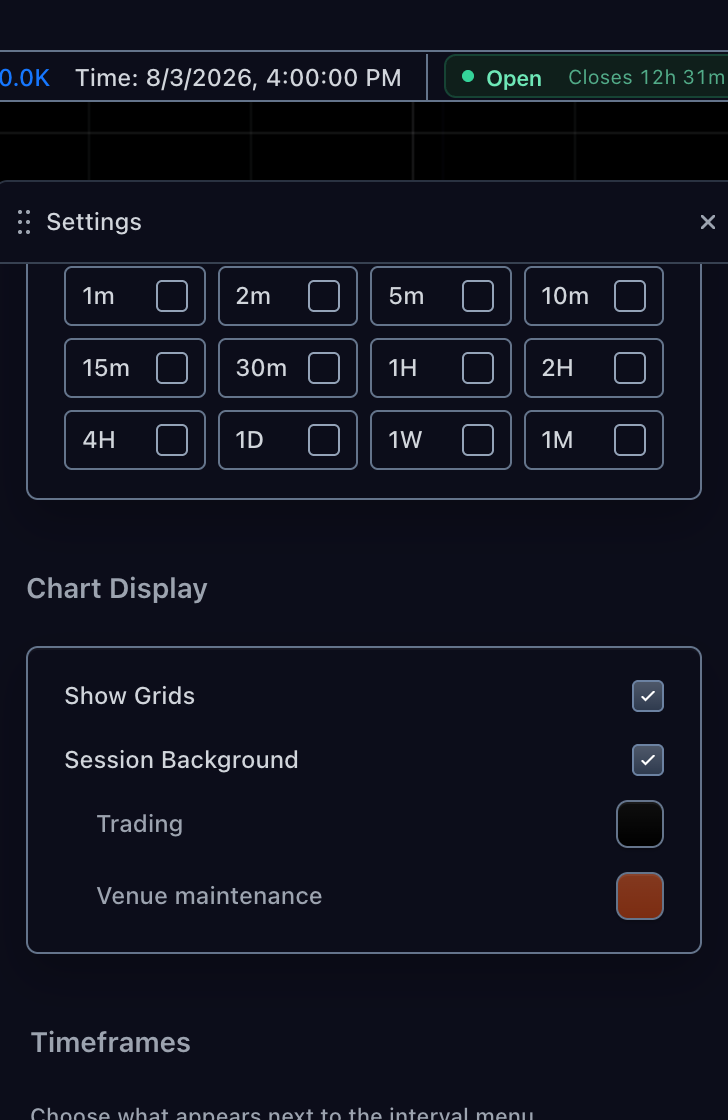
A schedule can carry custom window states beyond the built-in ones — a venue maintenance hour, an auction phase. To label those states and give them a color, return sessionPolicy next to the schedule in resolveSymbol:
async resolveSymbol(selection) {
  // ...lookup as in the reference implementation...
  return {
    // ...the same fields as the reference implementation, plus:
    sessionSchedule: record.schedule,
    sessionPolicy: {
      kind: 'calendar',
      states: [
        { id: 'regular', label: 'Trading' },
        { id: 'maintenance', label: 'Venue maintenance', defaultBackgroundColor: '#7c2d12' },
      ],
    },
  };
}
Two things change on screen. Every window whose state is maintenance shades with the declared color — here, the venue's daily maintenance hour on a perpetual:
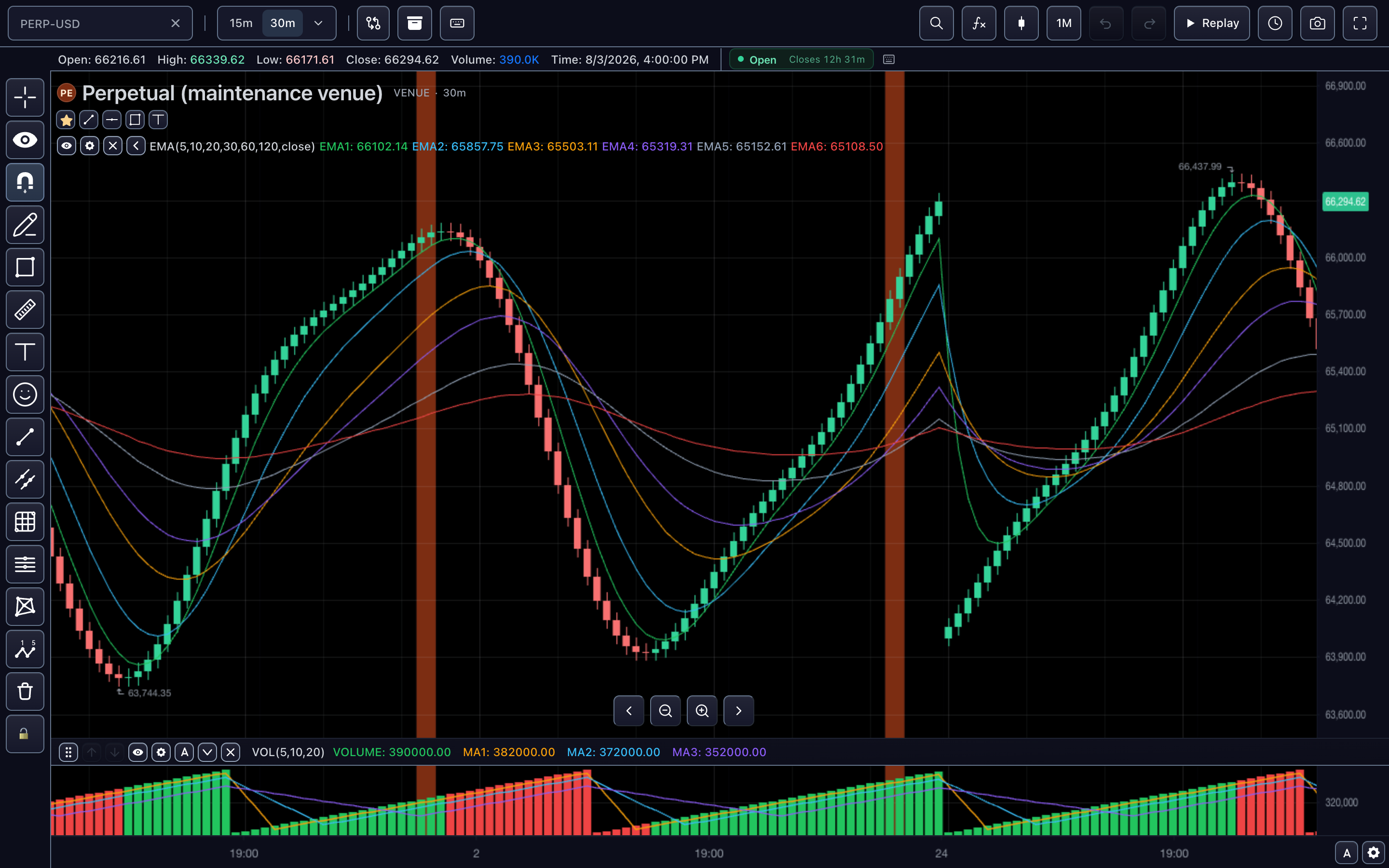
And the chart's settings panel lists the declared states under Session Background, with the labels and default colors you returned — users can recolor them, and their choices persist per chart:
The three wrappers
withSymbolSessionSchedules(myFeed)— serves session data from each symbol'sschedule.createCachingDatafeed(..., { policy: 'persistent' })— candles survive reloads.createSessionFilterDatafeed(...)— the regular/extended hours toggle for users.
Wrap in that order: schedules innermost, filter outermost.
Error reference
| You see | It means | Fix |
|---|---|---|
datafeed.resolveSymbol | Resolution returned no usable symbol for the selection. | Return a symbol with a non-empty ticker from resolveSymbol. |
validation on a variant load | A converted/bid/mark series arrived without a series id. | Add marketDataSeriesId for that variant. |
datafeed.session-calendar-missing | Session filtering was on but the symbol has no calendar. | Add a sessionSchedule, or declare sessionPolicy: { kind: 'unfiltered' }. |
datafeed.session-unavailable | Session info was requested with no declared hours. | Add a sessionSchedule or a session descriptor. |
datafeed.unsupported from the option chain | Chart switching was requested without a contract mapping. | Supply chartBridge next to onChartSelection (Option Chains). |
Realtime session-filter failures cannot reject a load call; subscribe to them with subscribeSessionFilterErrors on the wrapped feed to route them into host telemetry.
Migration from single-asset feeds
- Nothing to migrate in caches: the persistent store re-keys itself and old ticker-keyed entries simply refetch.
- Add
selectionIdonly where tickers can collide andmarketDataSeriesIdonly where variants exist — a plain feed needs neither. - If you relied on crypto/forex classification for hours, add the schedule declaration; classification no longer implies anything.
Next steps
- Symbol Search — the picker contract behind the search rows.
- Session Schedules — custom hours, holidays, and revisions behind the schedule map.