Pair a TradeScript Session
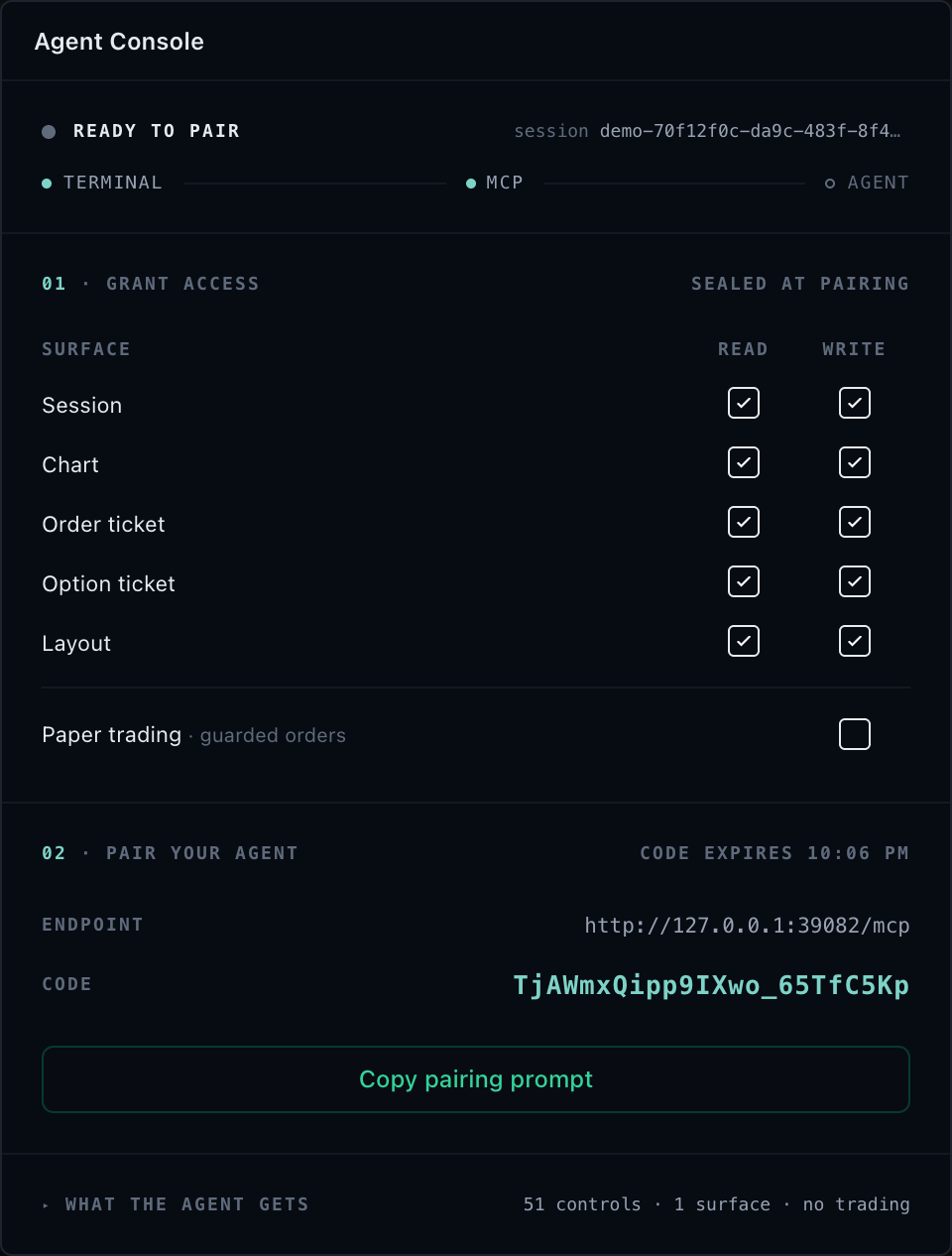
Installing the MCP server does not expose a chart or terminal. The embedding application must attach its SDK agentic adapter and connect that attachment to a loopback or customer-hosted browser bridge before an agent can discover it.
MCP stdio connections and TradeScript browser sessions are separate identities. Opening an MCP client never grants chart, widget, data, or broker authority by itself.
The minimum pairing path is three steps: generate a token, pair the client, verify the session. Each step below is runnable on its own; the complete lifecycle-managing implementation is collapsed at the end.
1. Generate the token
Start the local server from the agent host. If --pairing-token is omitted, it generates a session-bound token and prints it only to standard error:
npx tradescript-chart-mcp stdio
Read the browser WebSocket URL and pairing token from standard error:
[chart-mcp] browser bridge: ws://127.0.0.1:39081/chart-mcp
[chart-mcp] pairing token: <generated-token>
Automated local hosts can instead supply a strong token explicitly through TRADESCRIPT_CHART_MCP_PAIRING_TOKEN.
The token grants an MCP client the access class the adapter allows. Read it from standard error only, and never place it in prompts, labels, URLs, screenshots, activity logs, or bug reports. See Token handling.
2. Pair the client
In the embedding application, create one attachment with an opaque session ID and a policy that only narrows the adapter maximum, then connect it to the loopback URL with the token from the previous step:
import { attachTradeScriptSession } from '@tradescript/chart-mcp/browser';

const session = attachTradeScriptSession(tradeScriptAdapter.agentic, {
  sessionId: 'terminal-session-7f3a',
  title: 'Research terminal',
  access: {
    read: true,
    write: { families: { chartNavigation: true, drawings: true } },
    trade: false,
  },
});

const connection = await session.connectWebSocket({
  url: 'ws://127.0.0.1:39081/chart-mcp',
  token: pairingToken,
});
The browser initiates the WebSocket connection. The first accepted pairing binds the token to that session ID. connectWebSocket resolves only after the server acknowledges the session and matching protocol version.
3. Verify the session
From the MCP client:
- Read
tradescript://sessionsand confirm the opaque session ID appears. - Call
tradescript_get_contextwith{ "scope": "session" }. A successful context response proves pairing and routing to that explicit target. It returns available targets, capabilities, projected state, controller revision snapshots, execution-environment facts, and available subscription channels. - Call
tradescript_list_controlswith one selected target. The target is required. Confirm both the effectivecontrolspage and the SDK-ownedunavailableControlsandunclassifiedControlsledger before acting.
A snapshot alone does not prove correct routing or authorization.
Complete implementation with reconnect and lifecycle handling
Use attachTradeScriptSession for all-in-one terminals, standalone widgets, and custom SDK agentic surfaces:
import { attachTradeScriptSession } from '@tradescript/chart-mcp/browser';

const session = attachTradeScriptSession(tradeScriptAdapter.agentic, {
  sessionId: 'terminal-session-7f3a',
  title: 'Research terminal',
  access: {
    read: true,
    write: {
      families: {
        chartNavigation: true,
        drawings: true,
        indicators: true,
        terminalLayout: true,
      },
    },
    trade: false,
  },
});

const connection = await session.connectWebSocket({
  url: 'ws://127.0.0.1:39081/chart-mcp',
  token: pairingToken,
  reconnect: {
    initialDelayMs: 250,
    maxDelayMs: 5_000,
  },
});
Call connection.close() to close one connection or session.detach() to close all connections, release subscriptions, and revoke that attached session.
Automatic reconnect deliberately reuses the original session ID and token. A token cannot be moved to a different session identity. If a reload creates a new session identity, establish a new authorized pairing rather than trying to make the old bound token adopt it.
Target identity
One attached adapter is one MCP session and may contain many surfaces:
{ "scope": "session" }for adapter-wide data, symbol-link, trading, risk, and other session controllers.{ "scope": "chart", "chartId": "..." }for one mounted chart.{ "scope": "widget", "widgetId": "..." }for one terminal or standalone widget surface.
Use target identities returned by context. A visible title is not authority. Never silently substitute the active chart or a similarly named widget. Re-read session context after remounts, workspace changes, or page reloads.
Token handling
- Transfer the token only through the trusted local host flow.
- Read credentials from standard error; MCP standard output is protocol-only.
- Never put pairing tokens in prompts, labels, URLs, screenshots, activity logs, or bug reports.
- Treat the token as reusable for the lifetime of its local server because reconnect uses it.
- Configure
--allowed-originwhen the browser origin is known. - Stop the local server and detach the session when access should end.
Local loopback tokens live only for the local process and are revoked by closing the connection, detaching the attachment, or stopping that process. They are not customer identity.
Customer-hosted session lifecycle
A customer-hosted gateway adds a separate authenticated session lifecycle:
- Your backend authenticates the principal and authorizes the requested grant.
- The gateway issues a one-time pairing code bound to tenant, principal, session, origin, grant, and expiry, plus a separate short-lived browser token.
- The browser attaches with the browser token. The MCP transport consumes the
pairing code once; all replay attempts, including same-transport retries,
fail with
PAIRING_CODE_CONSUMED. - Reconnect uses a token rotated atomically through the authenticated customer session API and the same binding; it cannot change tenant, principal, session, or grant. The old token is invalid as soon as rotation succeeds.
- Expiry or an authenticated revoke immediately prevents further routing.
Pairing proves possession of a one-time session credential. It does not replace your customer authentication, authorization, broker policy, or risk controls. The customer owns the session store and durable audit evidence. Pairing codes and browser tokens must never enter widget snapshots, layout persistence, analytics, prompts, URLs, or local storage.
Next steps
- Controls and Resources — the six stable tools and how a paired client discovers what it may call.
- Customer-hosted deployment — provide authenticated issue, rotation, and revocation on infrastructure you control.
- Security — set the host maximum, separate trade authority, and retain audit evidence.
- Troubleshooting — diagnose an empty sessions resource or an unknown target.